Tag: write better

  • How to Write Better: 10 Straightforward Techniques

    How to Write Better: 10 Straightforward Techniques

    Whatever you write, you want to get your thoughts across in a clear and effective way — that’s the first thing you need to know about how to improve writing skills.

    If you’re a novelist, you don’t want awkward word choices or repetitive sentence structures to distract your readers from the story.

    As a freelancer, you don’t want your work to seem sloppy or poorly edited.

    When you blog, you don’t want readers to switch off because you’re far too wordy.

    Want the good news? Even if your writing skills aren’t as strong as you’d like, there are plenty of straightforward techniques you can use to improve them.

    Here are some suggestions on how to write better.

    [sps_reusable_block post_id=43052]

    How to improve writing skills: 10 new ways to clean your copy

    No matter how much of an expert you are, all writers can stand to pick up a few tips to learn how to write better. The same way a piece of writing is never “done” being edited (there’s always something), the work to improve your skills doesn’t end. 

    Whether you write articles, blogs, social media copy or research papers, here are 10 techniques to use to help you write anything well.   

    1. Cut unnecessary words

    Here are two paragraphs that say the same thing. Which one is stronger?

    Example 1: In my opinion, the majority of freelancers should probably avoid working for free (or for a nominal sum) unless they are at a very early stage of their career and as yet have no pieces for their portfolio at all.

    Example 2: Freelancers shouldn’t work for free unless they’re just starting out and don’t have any pieces for their portfolio.

    The second clearly states a stronger case, especially since it reaches the main point with fewer unnecessary words you don’t need in a sentence.

    If you write a blog post, most readers will assume it gives your opinion, so you don’t have to state that. Mastering brevity is an easy way to improve writing skills. Simply be clear, firm and direct.

    2. Avoid well-worn phrases

    Some phrases are so familiar they’ve lost their impact: they’ve become clichés.

    For instance, “In my opinion,” from the previous example is a phrase you can always cut. Here are a few others:

    • At the end of the day…
    • Like stealing candy from a baby…
    • For all intents and purposes… (sometimes miswritten as “for all intensive purposes!”)
    • Let the cat out of the bag…

    It can be tricky to spot these in your own writing, so take a quick look through this huge list of clichés to avoid here on the Be a Better Writer site.

    When you edit, you don’t need to cut every cliché…but check whether it might work better to rephrase.

    In dialogue, or in a first-person narrative, clichés can be a helpful way to characterize someone’s speech or thought patterns — but if you want to improve your writing skills, make sure you’re careful and deliberate.

    3. Write directly to “you” (in nonfiction)

    Although this isn’t appropriate for every form of nonfiction, bloggers and freelancers often write directly to the reader as “you.”

    This is a great way to make your writing better, direct, conversational and stronger.

    Blog posts and articles quite often use “you” or “your” very early on, in the title and/or introduction. For instance, this post on The Write Life:

    Freelance or Full Time: Which Journalism Path is Right for You?

    Want to work in the media industry as a writer?

    You generally have two options: You can seek employment as a staff member of a publication, or look for freelance writing opportunities.

    (Emphasis mine.)

    Or this one about book formatting: 

    How to Format a Book: 10 Tips Your Editor Wants You To Know

    Unless you prefer your friends to be story nerds or those who lean toward obsessive-compulsive tendencies when it comes to grammar, you shouldn’t necessarily seek to befriend your editor.

    Similar to these examples, use the singular “you” and avoid phrases like, “Some of you may know”. Yes, you (hopefully!) have more than one reader, but each reader experiences your piece individually.

    You can also use “I” where appropriate (e.g. to give an example from your own life) — though, usually, it’s best to keep the focus of your piece on the reader.

    4. Vary sentence structures

    What’s wrong with this paragraph? 

    You should write regularly (not necessarily daily). You should aim to write at least once or twice a week (I recommend a total of 3 – 4 hours per week). You may find it difficult to keep this up at first (especially if you’ve not written much before).

    There’s no question the advice it shares is sound and reasonable. Plus, there’s nothing wrong with the actual words used. Still,  the structure of each of the three sentences is very similar: each one starts with “You” then a modal verb (“should”/“may”), and each one ends with a phrase in parentheses.

    When you have several sentences in a row that follow the same pattern, they stand out…in a bad way.

    Sometimes, it’s appropriate to structure your sentences like this — e.g. in a bullet-pointed list — but in regular paragraphs, it’s often unintentional on the author’s part, and it seems artless and poorly edited to the reader.

    For more help with sentence structure, check out, “It Was the Best of Sentences, It Was the Worst of Sentences: A Writer’s Guide to Crafting Killer Sentences,” by June Casagrande.

    5. Use subheadings as signposts

    If you write blog posts, articles or sales copy, subheadings are crucial.

    They break up long pieces and help readers stay focused; they also offer “signposts” to readers who may skim for specific information.

    When you craft your subheadings, think about how to:

    • Make them clear and direct (just like titles/headings) – Don’t try to get clever!
    • Keep them short  – Subheadings have a larger font than regular text and don’t generally look good when they wrap around the end of a line.
    • Be consistent with the structure – For instance, each subheading might start with an imperative verb (as in this post).

    6. Use direct, straightforward language

    It’s rare that you’ll want to write something deliberately indirect! That would be the opposite of better writing. Instead, you’ll want your words to come across clear and strong to the reader.

    This means avoid the passive voice like the plague — advice most writers have heard before as they learn to improve their writing skills.  In case you need a recap, here’s a quick rundown:

    Active voice: John threw the ball. ➜ Succinct and clear.

    Passive voice: The ball was thrown by John. ➜ Wordier and less direct.

    The passive voice omits the agent (the person who performs the action) from the sentence altogether: The ball was thrown. See?

    This small detail can be useful in many ways to make your writing better; for instance, you might write about something where the agent is unimportant, or where you want to conceal the agent. (“Mistakes were made” is a classic example here.)

    A good rule of thumb is to always write in a direct, straightforward way.

    Make it as easy as possible for readers to engage with your ideas or your story.

    7. Read aloud (or edit on paper)

    No one’s first draft is perfect, and the above six suggestions should help you rework yours.

    Often, it helps to go through your piece at a slow and methodical — many writers find it helps to read aloud since it highlights the cadence of your words.

    If you prefer not to read aloud (or if your colleagues, family or cat would give you funny looks if you tried it), then print out your draft so you can edit it on paper.

    Use a different format to make it easier to spot typos and repetitive phrasings.

    At times when it isn’t practical to print, I’ve also found it helpful to convert my draft digitally: that might mean I turn a Word document into a .pdf, put a novel manuscript onto my Kindle or preview a blog post so I can get closer to the reader’s experience.

    Confident, powerful writing will help your message (or your story) have its full impact on your reader.

    8. Use a grammar checker

    If you have a serious desire to learn how to write better and don’t have access to an in-person editor, consider using a grammar checker tool.

    It’ll help you fix grammar and replace common words with more unique options. Some tools even tell you why you should make a certain change, which is an added bonus because it helps you further learn and improve your writing skills.

    (But remember, don’t write and edit at the same time!)

    9. Liven up your writing with descriptive verbs

    Adverbs are the pesky parts of speech that can be tough to eliminate from your writing.

    Because they’re descriptive words that modify verbs, adverbs that end with -ly constantly find their way back into sentences. Since people use them so commonly, they sneakily manage to influence our vocabulary. 

    Did you notice all the unnecessary adverbs? Here’s another way I could’ve written that sentence: 

    … adverbs that end with -ly always find their way back into sentences. They’re easy to use in conversation, so adverbs are sly in how they influence our vocabulary. 

    To improve your writing skills, tighten your copy and clear your blog, novel or article of -ly adverbs you can replace with more descriptive verbs. The first way I wrote the sentence isn’t incorrect, but the second version is less wordy and complex in comparison. Plus, it contains less fluff. 

    Rather than write, “She drove quickly down the street,” focus on the action to help your reader: What’s the driver doing? Speeding, so you could write, “She raced down the street at lightning speed.”

    It’s a small change to swap out adverbs, but the impact is huge when you do so to better your writing with powerful verbs and less fluff.

    10. Make your sentences flow

    Your amazing story won’t reach your readers if it’s not composed with sentences that pace well, have proper punctuation and vivid details to enhance the reader experience. 

    If someone has to read your sentences more than once to grasp the main idea, that means your writing lacks flow. 

    To improve your writing and create more flow, incorporate this checklist of sentence structure elements in your writing routine:

    • Contractions – Despite the old-age advice, a lack of contractions — didn’t, can’t, weren’t — dampens your writing with stiff informality. Smooth sentences that flow require the use of contractions to make them less uptight, plus they make your writing more conversational, personable and easier to comprehend.
    • Punctuation – Take risks with punctuation to add rhythm to your writing. Without semicolons, em-dashes, apostrophes, periods and more, our stories would fall flat with no diversity in tone, cadence and feeling. For example, you can use ellipses to add mystery… Or, allude to a somber tone with shorter sentences; the kinds that create tension in your story, one word after the word. 
    • Imagery – Paint a picture for your readers that lures them in page after page, or scroll after scroll. You can make boring sentences all the more exciting with vivid details that create visuals strong enough to ignite your reader’s imagination. Don’t go overboard and paint the entire picture — just enough to keep them going.

    Besides these 10 effective tips to use to be a better writer and improve your skills, the one thing you have to do is write. (Then, don’t stop.)

    This is an updated version of a story that was previously published. We update our posts as often as possible to ensure they’re useful for our readers.

    [sps_reusable_block post_id=43052]

    Photo via Alissa Kumarova/ Shutterstock

  • 5 Simple Steps to Write a Headline Your Editor Will Love

    5 Simple Steps to Write a Headline Your Editor Will Love

    Are you sending off query letters to magazine or blog editors, but never hearing a peep back?

    It’s a common problem. Often, the problem has to do with your headline.

    And, if you’re sending pitches that don’t mention a proposed headline, this might be your first problem — editors tend to skim through queries, looking for the headline. If they see none, they might assume your idea hasn’t quite gelled yet, and move on.

    Now that you know you need to include a headline in your pitch, how can you make it one your editor will love? 

    I’ve pitched both popular blogs and national magazines with success, and run a guest-post program for my own blog, so I’ve been on both sides of the fence here. Over the years, I’ve learned there are some basic things to do to build a fascinating headline that gets you hired.

    What are they? Here are five simple steps to make your headline irresistible to editors.

    1. Bring the style

    Your starting point for creating a great headline is always to study the headline style of your target publication. Study, study, study.

    How long are their headlines? Are they businesslike, snide, sassy or hip? 

    Skim until you have a sense of their headline conventions and tone. Then, emulate their style in your headline.

    Research is key because headline conventions vary a lot. With blog post headlines, you’re usually looking for a snappy, 8-10 word headline. For instance, here’s one I did for my Forbes blog that ended up pulling huge traffic:

    “Meet the 8 Hottest Publicly Traded Marijuana Companies”

    By contrast, magazine article headline style can be a very short headline, followed by what editors call a ‘dek,’ a longer line that fleshes out the idea. For instance, here’s the headline of a piece for Delta Airlines’ in-flight magazine, Delta Sky:

    “The Do’s and Don’ts of Franchising: What potential franchisees need to consider about timing, industry choice, finances and more before they decide to take the plunge”

    Know and use the style of your target publication, and your editor will be able to envision your article appearing in their pages. 

    That’s the first step to getting a ‘yes.’

    2. Include keywords

    You might think search engine optimization (SEO) would only matter for online blogs and publications — but you’d be wrong. Increasingly, print magazines are also posting their content online. 

    That means they care about using phrases their audience might search for the topics they cover. They’re looking to have each headline help them attract more readers.

    When I wrote pieces for Forbes magazine that they also posted online, my editor had me write a different headline for the online version — one with better keywords. If you know your magazine swings both ways, suggesting two headline styles can be a pro move.

    There are plenty of free keyword search tools online – AnswerthePublic and Neil Patel’s UberSuggest are two popular ones I like. Pick your favorite tool, think like a reader and take a stab at using relevant keywords.

    3. Hook ‘em

    If you want your headline to really get your editor excited, it’ll need to have a news hook.

    What’s a news hook? It’s something new that makes your idea need to be published now. It signals you have fresh information that we haven’t already seen 100 times online. 

    The news hook gets your editor thinking, “This must run in the next issue!” instead of “Well, maybe this could work sometime.”

    To interest an editor, you’ve got to move beyond generic headlines like: “5 Reasons Eating Vegan Will Improve Your Health.” We’ve read that story already. A lot.

    Find a fresh spin. Is there a new study about vegans’ health? A new celebrity going vegan? Gotta give that editor a new angle on this popular topic. 

    A news hook might be one new fact that’s emerged in an ongoing story — the coroner’s report was released, or a new candidate has entered the race. It could be an anniversary of a major event. A year (or a decade) after the big earthquake, fire or flood. As I write this, there are lots of “Amazon turns 25” stories, for instance.

    Getting a news hook into your headline is an easy way to get your editor excited.

    4. Narrow the focus

    Another quick way to show you ‘get’ the publication is to narrow your topic by weaving the audience into the headline. 

    So it’s not “5 Reasons Eating Vegan Will Improve Your Health”, but “3 New Studies on Vegan Diets That Parents Need to See.”

    Now, we’ve zeroed in on who this publication’s readers are. Showing that in your headline lets the editor know you really get their audience — and makes them more likely to assign you a story.

    5. Be fresh

    The final step in creating a headline that gets editors interested is to get creative, especially if you want to cover a popular topic. What can you add that makes the headline fascinating to readers? How can you signal, right in the headline, that you have information not found elsewhere? 

    For instance, after Fiverr bought rival freelance intermediary platform ClearVoice, there were loads of stories about it. I wanted to cover it on my own blog, but how to be different? The answer was to interview their CEO. 

    Then, I built a headline that spotlighted my unique coverage of this business news: 

    “Fiverr Buys ClearVoice: Their CEO on the Future of Online Writing”

    Conducting interviews for your article is something magazine editors will expect – so start thinking about sources. Practice with a friend, if you have interview jitters! 

    Writing great headlines takes practice. Allow time to experiment with your headline and perfect it, and it’ll pay off with more assignments.

    This post contains affiliate links. That means if you purchase through our links, you’re supporting The Write Life — and we thank you for that!

    Photo via Pressmaster/ Shutterstock 

  • 3 Ways Scrivener Makes Self-Publishing a Breeze

    3 Ways Scrivener Makes Self-Publishing a Breeze

    Professional creators should use professional tools.

    After all, how would you feel if you went to a restaurant and noticed the food was being cooked in cheap microwaves by chefs using low-quality equipment? You would probably rightly assume the output from substandard tools would be a substandard meal.

    Writers are no different.

    To produce the best work possible, it’s vital to find the right tools for the job.

    How many writers do you know who still use a standard word processor app like Microsoft Word? Perhaps you even do yourself. Why? It’s often due to a lack of knowledge about what else is out there.

    I still remember the day I found something better and tried it out for the first time.

    That something better was a writing tool named Scrivener.

    Here’s how this tool has made a major difference to my writing process.

    1. Better research and planning

    The self-publishing marketplace is more crowded and competitive than ever before.

    In the past, it was possible to release a hastily written book containing the minimum of research, and still experience success. Those days are gone. Success in the current climate requires careful and conscious research.

    Research isn’t easy. We live in an era of unprecedented information and ideas.

    Curating the best and most suitable concepts for your book is no easy task. Yet so many writers make it even tougher than it needs to be by taking a scattergun approach to the collection and storage of information.

    Before I discovered Scrivener, my research process typically involved a mess of folders, files and illogically named documents. Even worse, leaving my writing software and accessing my research disrupted my creative flow and led to procrastination and distraction.

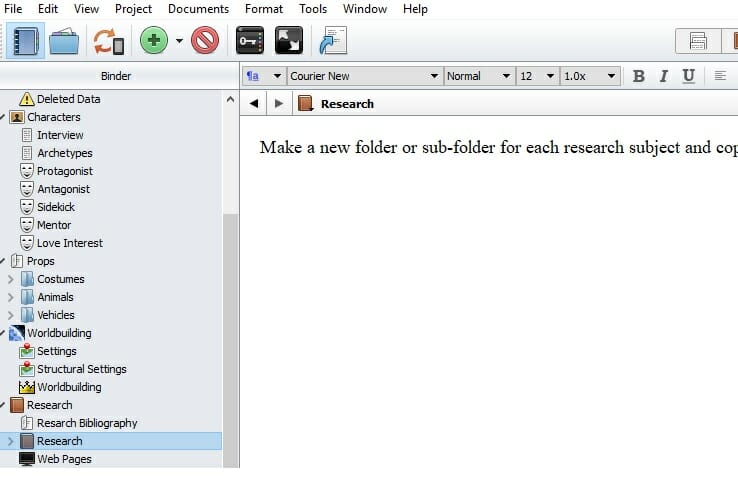
    Scrivener helped me to collect, organize and access my research in a way I never even knew was possible. Within Scrivener, you have all of your research directly available, next to the actual writing environment itself, as seen below.

    Being able to see all of your research without having to leave your writing software is an incredible time-saver and productivity-booster. You never have to run the risk of forgetting about a useful piece of research while in the throes of creation.

    Scrivener painlessly integrates text, visual and online research. It also syncs up with Evernote, making Scrivener a superb choice for Evernote fans.

    Some of the best research and planning features of Scrivener for fiction writers include the ability to create, store and access detailed character notes, create a detailed and useful outline of your story, and to store images and ideas related to setting and location.

    Professional writers need professional tools. Improve your writing process from start to finish with Scrivener.

    2. Writing well

    Any specialist writing software worth your time and money needs to offer functionality and benefit when it comes to the actual activity of writing itself.

    While research and planning are important, the core activity for writers will always be, unsurprisingly, writing itself. Thankfully, Scrivener does not disappoint in this area.

    Some of my favorite aspects of writing while using Scrivener include –

    • The ability to write in a distraction-free fullscreen mode
    • The option to use a template created by another writer to structure my work in a tried and tested way
    • Setting quantified writing targets and visually monitoring my progress towards them in real time
    • Being able to quickly and easily rearrange chapters and scenes as I write

    Write without distraction

    If you’ve ever struggled with the problem of being able to zone in on your writing and get things done, you will appreciate the full-screen composition mode offered by Scrivener. It’s a way of digitally tuning out the distractions of the world and zoning in on the vital process of stringing sentences together.

    As you can see from the above image, Scrivener blocks out everything but the words you are writing. If you combine this with a time period where you turn off your internet and cellphone, you will truly be able to focus on your writing. The full screen mode shown above displays a plain background, but you can also customize the image seen. Views of nature are a popular choice.

    Use templates for successful structures

    One of the toughest challenges for me was knowing the proper structure to use when setting out to write a book. This is another area where Scrivener excels.

    You can easily download, import and modify Scrivener templates. This gives you a predefined structure for your manuscript and research which allows you to focus on the act of actually creating.

    Using templates in Scrivener can also give you the confidence to try out a style or method of writing you may not have experience with. For example, if you’ve wanted to write a screenplay, but haven’t known exactly how, a template can be your best friend.

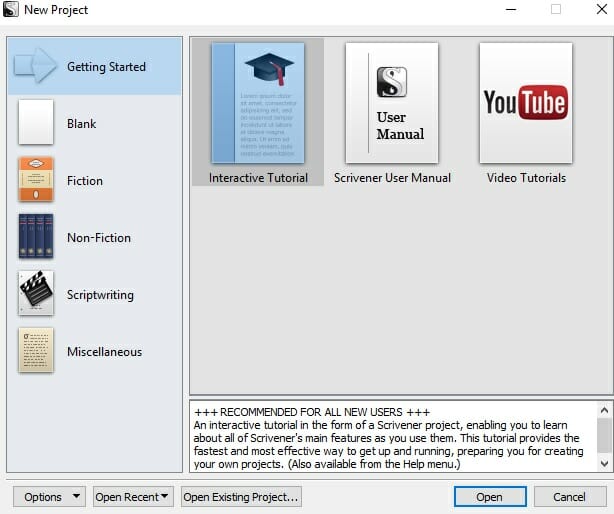
    The above image shows the template selection available when loading up Scrivener. You can always add and modify templates depending on your personal requirements.

    Set targets and monitor progress

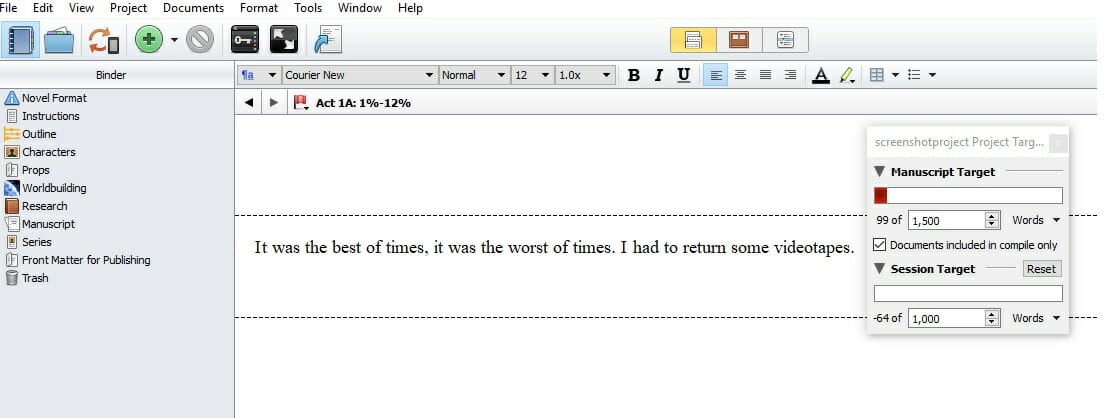
    Almost every writer has a unique approach to measuring progress and monitoring projects. If you like to set targets for your writing, and ensure you stay on track, Scrivener makes it easy. You can easily set writing targets for an individual writing session, or an entire project, and quickly monitor your progress towards them, as seen below.

    You can see that the progress box floats over your writing and shows both your overall and session targets.

    Scrivener also allows you to quickly combine, separate and rearrange the individual pieces of a writing project. If you are rewriting nonfiction, and aren’t exactly sure of the order you want your chapters to be in, it’s easy to switch up the sequence, as seen below.

    3. Formatting and sharing

    Have you ever experienced the joy of seemingly finishing a writing project, only to experience unexpected frustration when finding the right format for your work, and exporting it, becomes a nightmare?

    This is especially true when writing in software like Microsoft Word. It can be tricky to impossible to find a way of easily converting your work into the right file format. Even if you do manage to export to the file type you need, there’s often no guarantee that your work will look the way you wanted in its final form.

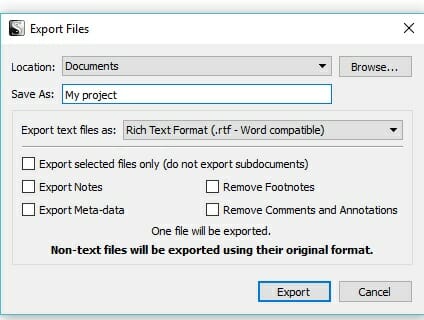
    In Scrivener, you can ensure that your writing project will look exactly as you intended after you export it. Some of the options for doing this can be seen below.

    Scrivener also supports a wealth of export file formats, which are suited to different types of writing.

    Some of the file format supported by Scrivener include –

    * .epub (used for Google, iBookstore, Nook and Kobo)

    * .mobi (used for the Kindle store)

    * .html (used for webpages)

    * .PDF (used for Adobe Reader)

    * .doc (compatible with MS Word and Google Docs)

    This powerful export capability can save both time and money. Exporting with Scrivener can save on the need to hire a freelance worker to carry out the format process for your book. It also can help you to avoid having to invest in a separate piece of software to get the file format you want.

    As well as being great for full ebooks, this file format versatility is well-suited to blogging. Bestselling author Michael Hyatt decided to switch to Scrivener for all his writing projects, not just his books. While you may not decide to go this far yourself, it’s good to know that Scrivener is suitable for whatever type of writing project you decide to engage in.

    Better Books With Scrivener

    Writing a book is a demanding endeavour requiring software that is up to scratch. Scrivener not only produces a better final product, but also makes each and every stage of the writing process easier along the way.

    If you have any questions about Scrivener, feel free to comment and I’ll be happy to respond. I’d also love to know about any awesome Scrivener benefits you’ve discovered that I haven’t mentioned here.

    This post contains affiliate links. That means if you purchase through our links, you’re supporting The Write Life — and we thank you for that!
    links

  • Sharpen Your Writing Skills: 6 Free Tools to Help You Write Better Blog Posts

    Sharpen Your Writing Skills: 6 Free Tools to Help You Write Better Blog Posts

    As a writer, your salary may depend on the number of articles you can get published, as well as the the number of words in your articles.

    To make the most money possible, you need to establish a process that will allow you to write as many high-quality articles or blog posts as possible.

    But sometimes it’s not feasible to churn out articles on a consistent basis. There are times when you feel like writing all day, while there are days when you can’t even muster a single word.

    As a result, you might find yourself struggling to make a living because you rely only on inspiration and natural momentum to complete your writing tasks.

    You need to remember writing is a discipline. Without a reliable process to practice your writing skills, you will not be the successful freelance writer that you aspire to become.

    These six free tools can be a part of your own perfect system that helps you write more effectively — and helps you spend less time doing it.

    1. Soovle

    If you’re a content writer, you need to determine the best keywords for your content. Choosing keywords can be a long-winded process, but you can simplify it by using Soovle.

    This online tool lets you find most-searched phrases from popular search engines and even includes Amazon and Wikipedia to find the most common phrase that relates to your topic.

    Use the keyword phrase that appears on all Soovle’s aggregated sites so you can optimize your content and boost it to the top of these search results.

    2. Hubspot Content Idea Generator

    Finding it difficult to come up with a title for your content? Hubspot Content Idea Generator will create one for you.

    This tool lets you brainstorm headlines for your blog posts using a target keyword or phrase (perhaps the SEO-friendly keyword you discovered through Soolve!). After submitting at least one keyword phrase out of three available fields, the generator will return five interesting titles.

    If you’re not satisfied with the results, you can try again for another batch of title suggestions. Repeat the process until you find the most appropriate headline for you.

    3. CoSchedule Headline Analyzer

    Crafting an effective headline is an art — you need to choose deliberately to invoke the intellect and emotions of your readers.

    While the title suggestions from Hubspot may be interesting, they may not be enough to compel your target audience to click when they read the headline in search results or on social media.

    Enter the CoSchedule Headline Analyzer.

    The tool refers to different factors to compute an aggregate score of your title. Ideally, your title must possess common, uncommon, emotional, and powerful words to achieve a high score. CoSchedule recommends using headlines with a score of 70 or higher.

    Test a few different headline options to see which has the highest score. You might be surprised!

    writing tools

    4. Noisli

    Distractions are productivity thieves. It’s difficult to focus on writing online where sites like Facebook and YouTube are just a click away from the resources you actually need to consult.

    It’s next to impossible to build writing momentum when distractions just around the virtual corner.

    Noisli aims to help people focus on work by playing different sounds sure to calm your nerves and inspire you to write. You can mix different sounds, from falling rain to the whirling of a fan, so you can achieve the perfect sound of productivity for you. You might find it boosts your energy better than your go-to playlist.

    Noisli also offers a minimalist text editor so you can write your content there without distracting buttons and links.

    5. Grammarly

    It’s important to review your work for errors before submitting to editors. But small mistakes always seem to slip through the cracks, don’t they?

    Human error increases the chance your article will get sent back for edits, and lowers your chances of even getting published on many sites. Editing articles you’ve already written takes away from your writing momentum.

    Enlist Grammarly to check your grammar, spelling, and sentence structures before you submit your work. The Premium version of the tool lets you look up better word suggestions, check for plagiarism and more.

    But, the free version is great for checking your article for simple mistakes you might miss while you’re working.

    6. Hemingway

    There’s no single perfect method for writing an article or blog post. But if you want more people to read your work, it can help to make sure it’s easy to understand.

    Hemingway helps you remove the clutter in your posts by identifying sentences and phrases that are difficult to understand. The tool also computes a readability score of your article. The lower the grade level, the easier it is for readers to understand what you’re trying to say.

    What other tools help you write more — and more quickly? Share them in the comments!