As a writer, you are likely already using social media to promote your published work—or you should be! And since you’re already a wordsmith, cobbling together clever and engaging tweets, Facebook posts, and descriptions for Pinterest and Instagram comes fairly easily to you.
Knowing this, have you considered putting your writing skills to work by offering social media services?
Businesses everywhere are jumping into the world of social media, but tons of them just don’t have the time or know-how. While they may not always advertise their need for a social media manager or content creator on LinkedIn or Craigslist, you can easily identify five businesses in your city that are doing a poor job with social media. (Of course, you’re not limited to local clients when it comes to social media, but they’re a great first option.)
How to find social media clients
Start with your existing clients, the ones who already know your work as a writer. Simply shoot them a message letting them know that you are now offering social media services and ask whether they know anyone who needs this kind of support—or if they need it themselves. If your clients are willing to contact their networks, craft an email to make it easy for them. Add an incentive by offering a free hour of work in exchange for each referral.
To land new clients, reach out to some of your favorite local restaurants, retailers or bars. Just like you might pitch an editor by leading with a compliment on their recent work, you can do the same when you contact a business you already enjoy.
I’ve been able to land a few new clients by gently pointing out an easy way to improve their social media, like claiming their Facebook vanity URL, beefing up their Facebook About page, or adding milestones to their history. Including tips like these in your pitch shows that you know your stuff and adds value for the business—you’re helping them out before they’ve even hired you.
Finding ongoing work with your new clients
Signing a new social media client opens the door to the possibility of taking over additional writing-based tasks. Maybe you could launch or contribute to their blog, or write and distribute their monthly newsletter. Perhaps they need some canned response emails, press releases or updated website copy.
When you begin new relationships with businesses that constantly need content marketing, you set yourself up for steady gigs that don’t require pitching an editor or scouring a job board. And that’s a nice place to be.
How to price your social media services
Approach pricing for this work in the same way you do your writing services. You may want to offer an hourly rate to start out, but eventually I’d recommend moving to a monthly retainer package. This is basically your hourly rate multiplied by the number of hours you anticipate spending on work for the client.
Webpage FX has a detailed rate sheet for their social media services to give you an idea of what you might want to charge. Of course, you might want to start out with a lower rate to land that first social media client, but you’ll be able to raise it as you gain experience and client testimonials. The Write Life founder Alexis Grant also offers resources to help you build your social media business.
Keep in mind that you will average at least one hour per day (sometimes three to four hours), every day, creating content and responding to customer messages, so be sure to add some cushion to your rate. Social media never sleeps, and extra tasks occasionally creep in, so reevaluate the project scope periodically.
In this age of online everything, your web presence can make or break your freelance career, especially if you’re just starting out as a freelance writer.
If prospective clients don’t know you by reputation, they need a quick, easy way to suss out your work, your style and your level of professionalism. While social media accounts can do wonders (having a few thousand followers never hurt a freelancer’s credibility), you’ll need more than that as your online calling card.
That’s where your online portfolio comes into play. Even if you’re not quite ready to start a blog, a simple portfolio website that promotes your freelance writing can do a lot to help you land clients.
This Article Features 10 Portfolio Websites to Consider
Regardless of which of these portfolio websites you decide to go with, you should aim for these two things:
1.Easy-to-read clips: If someone is looking to hire you, their main goal in coming to your site is to read your work and see if they like it. Make it simple for them!
2. Uncluttered design: If a prospective client can’t find what they need in less than 10 seconds, you’ve got too much going on. You’ve lost their attention… and a potential client.
Easy-to-use Portfolio Websites to Showcase Your Work
An online portfolio that fulfills these two basic criteria doesn’t have to be complicated to create. You’ve got lots of good portfolio design tools to help you get there! And if you’re looking for free portfolio websites, we’ve got you covered there too.
When you’re ready to land your next freelance writing job, here are some easy-to-use portfolio websites to choose from.
1. Squarespace
Squarespace is an effortless drag-and-drop website builder that offers a stellar visual experience. While this isn’t a traditional portfolio website (nor is it targeted solely at writers), it’s a really good choice if you incorporate design or graphics into your work.
Their templates give off a clean, minimalist and sophisticated vibe. And their responsive design is rock solid—an important factor when prospective clients want to view your writing on their phones or tablets. While there are many website building tools—like Wix and Weebly—Squarespace comes out ahead for its sleek visual design.
Cool Feature: Stuck on a design issue while building your portfolio at 3 a.m.? Squarespace’s 24/7 client support (via email or live chat from Monday to Friday) is top-notch. Being able to communicate with a real human being when you have a question or issue can make freelance life that much easier.
Upgrade option: It costs $12 per month for a personal website with a free custom domain. For business and commerce versions, which include SEO features, advanced analytics, fully-integrated e-commerce and unlimited storage, it costs $18 to $40 per month.
2. Clippings.me
Clippings.me was created explicitly for freelance journalists. It gives you a quick and easy way to show off your favorite clips, and add just enough detail about yourself to make you seem human. Like Journo Portfolio, you can add links, upload PDFs or embed multimedia pieces, including podcasts. And if you get stuck finding the right words to sell yourself or if you need some design guidance, check out their Writing Portfolio Guide.
Clippings.me also offers an open journalism directory where you can browse journalists based on beats or by country to find potential interviewees for the stories you cover You could (hopefully) use it to gain access to more prospective clients.
Cool Feature: Simplicity is the name of the game. have the bare minimum technical skills but still want a refreshing layout for your online portfolio, this is a great choice.
Free version:Yes! It’s free for the basic version, which allows up to 10 articles.
Upgrade option:The pro version costs $9.99 per month, which includes unlimited clippings, downloadable resume on profile, contact forms, search engine optimization (SEO) and portfolio privacy, password-protected portfolio and features like Google Analytics integration so you can measure views.
3. Muck Rack
Muck Rack is a media database that helps connect journalists and PR pros—and their platform gives writers a slick way to easily showcase their work.
It creates and maintains the portfolio for you by automatically compiling articles, outlets, and social media profiles, which is one of the easiest options in terms of both set-up and maintenance. You can customize your page by adding a bio, listing your beats and spotlighting your best pieces.
Muck Rack boasts it’s the easiest, most unlimited way to build your portfolio, grow your following and quantify your impact. The best part? It’s all free.
Cool Feature:Do you ever wonder how big your reach is? With Muck Rack’s Who Shared My Link tool, you can instantly see the total number of social shares for your article and which other journalists shared your stories.
Free version: Yes! It’s free for all users. Additional features are unlocked for journalists Muck Rack verifies—check out the criteria to become a verified journalist.
4. The Freelancer by Contently
The Freelancer by Contently is a portfolio website specifically for freelance writers and journalists. In addition to serving as your online portfolio, it can serve as a place to find work and connect directly with clients. Here are its top three compelling features:
It uses a simple and single-page portfolio interface where you can display an unlimited number of projects or blog posts
Potential clients can filter projects based on the clients you’ve worked with, topics and skills, which are great for writers that work in multiple industries
Freelancers with professional experience might even be contacted for freelance opportunities with clients like Marriott, Microsoft and Walmart
Cool Feature:Contently has a rates database so you can see what other freelancers earn, and a freelance rates calculator to help you determine the amount you should charge for each client.
Free version:Yes! It’s free for writers. (Clients pay to tap into that network.)
5. Journo Portfolio
On Journo Portfolio, you can create a modern, no-fuss online portfolio. The dashboard is easy to use: customize your site’s look with six distinct themes, and sort your clips into any number of pages or content blocks.
Another handy feature is the range of ways you can share materials: link directly to clips (just type in the URL and Journo Portfolio will grab the title, publication, date, and content), or upload almost any kind of multimedia, including PDFs, videos and images.
Cool Feature: To help you keep track of your metrics, Journo Portfolio’s built-in analytics show you how many visitors your site has had, how long they spent on the site and where they came from. Wanna go the extra mile? integrate your dashboard with your private Google Analytics account so you can access all the raw data available.
Free version:Yes! It’s free for a name.journoportfolio.com URL, and you can host up to 10 articles.
Upgrade option:For the pro version, pay $5 to $10 per month. That includes unlimited pages, article back-ups, and the ability to use your own domain, like www.yourname.com.
6. WordPress.com
WordPress is the grandfather of content management platforms. While not specifically geared towards online portfolios, the joy of WordPress is that you can do pretty much anything you want with it. It’s available as a totally free, no-frills blog; a paid version with more bells and whistles; or the “install-it-yourself-and-do-whatever-the-hell-you-like setup.”
Your standard WordPress themes aren’t all ideal for portfolio work, but search Google for “WordPress portfolio themes” and you’ll have everything you could ask for—WordPress even offers this dedicated portfolio splash page! This is a great platform for people who want lots of options and total creative control (and who don’t mind fussing around with a little CSS).
Cool Feature:Since WordPress is so adaptable, it can be a good place to start if you think you may want something beyond a portfolio site somewhere down the line. That way, when you realize that you want to be both a freelance writer and photographer, you’re not stuck on a platform where you can’t show off your other skills.
Free version: Yes! For a basic blog.
Upgrade option: For more control over how the site looks and functions, some freelancers choose to upgrade to the $8-per-month premium option. That gives you access to marketing and monetization tools, unlimited premium themes and advanced site design customization.
7. Writer’s Residence
Run by Monica Shaw and Tim Harding, a writer and programmer duo in the UK, Writer’s Residence portfolios have two simple goals:
To make it hassle-free for writers to showcase their best work with a beautiful website
To give writers a valuable tool that they can use to market their careers
Whether you’re an aspiring freelance writer or a published author, Writer’s Residence understands that a well designed website highlights your professionalism and makes it easy for editors to see your work. Bring your own domain or use one of theirs, get creative with their variety of templates and use their “brain-dead simple system” to have your website up and running in 30 minutes.
Cool Feature:No HTML experience? No biggie! When you create a portfolio with Writer’s Residence, they take care of the design so you can stick to your expertise—writing. Here, you’d build your site with plain text using their simple forms. And if you do want to get fancy, customization is an option, too.
Free version: Yes! All accounts come with a 30-day free trial.
Upgrade option: After the trial, continue managing your website for $8.99 per month (or £5.49) on this easy platform that lets you upload an unlimited number of writing samples and provides prompt and personal customer support.
8. Writerfolio
The writing industry is highly competitive—make your writing stand out with an appealing and professional Writerfolio portfolio to leave a great first impression with clients and editors. That’s sure to land you your next writing job!
On this platform that also requires no computer skills, you can build a portfolio with unlimited writing samples with attachment uploads, a variety of themes to choose from, an easy fill-in-the-blanks portfolio setup and more.
Cool Feature:They have a 100% satisfaction guarantee—if you’re not 100% happy, they’ll refund you with no questions asked.
Free version: No, but you can try out a free demo without evening signing up!
Upgrade option: Memberships cost $4 per month and come with a complete online writing portfolio at yourname.writerfolio.com (but you can use yourname.com, if you already own it).
9. Format
Any kind of artist can find a home here, from photographers and designers to writers and illustrators. Format provides an impressive selection of curated themes to fit your unique brand, giving you a beautiful digital canvas to show off your best work.
Your portfolio with Format will be automatically optimized for mobile—so clients can view your work from any device—and you can enjoy unlimited bandwidth and blog posts, copyright protection for any image you upload, plus social media integration. Format will also give you a free domain name for a year!
Need some design inspo? Check out these writer portfolios using Format’s themes.
Cool Feature:For when you need to make a change on-the-fly, Format’s iOS apps make it easy for you to show off your portfolio, manage your menu items and create and write blog posts anywhere you go.
Free version: No, but you can try it free for two weeks to see if it’s a fit!
Upgrade option: With the Pro, Pro Plus and Unlimited plans, creatives can tailor their website with dozens of themes, custom code editing, 24/7 support and SEO tools. A bit on the pricey side, monthly membership costs range from $12 to $25
10. Carbonmade
Carbonmade has been building portfolio tools for creatives since 2005. Fifteen years later, they offer hundreds of features specifically built for creatives:
They can personalize your starting point layouts specifically for your profession
Carbonmade is automatically responsive and optimized for all devices so your site always looks great
You can link your own domain or choose from the ones included in all plans: name.carbonmade.com, name.portfolio.site or name.gfx.work options
Audio and PDF upload support
Cool Feature:Instead of sticking to a certain theme or layout, Carbonmade lets you use dozens of flexible layout blocks to design your website—just drag and drop to create your dream portfolio. No limitations here.
Free version: No, but check out the free trial!
Upgrade option: Monthly membership costs range from $8 to $18. For the cost of two coffee cups per month, writers typically enjoy the $8 plan for access to eight projects and unlimited images and videos.
Examples of online portfolio websites
Now that you’ve got lots of portfolio websites to choose from, want to see some of them in action?
We’ve compiled a list of online writing portfolios to inspire you. Here’s where to check out some online portfolio examples.
The original version of this story was written by Annie Rose Favreau. We updated the post so it’s more useful for our readers.
I talk about values of self-marketing and using tools such as a blog to meet people and make connections.
But then sometimes, a conference attendee will raise their hand and stop me, saying, “That’s all well and good, but how do we get people to actually read our blog?”
The question is so basic that it can be glossed over when I’m teaching, so I want to address it here in this post — and share a few social media tips that will assist you moving forward.
Although my specialty is publishing and I typically teach writers and novelists, these tips will help you learn how to be a successful blogger. All you need is an active Twitter account and a little creativity.
Before we begin, if you don’t have a blog already, you can easily check to see if your preferred domain is available:
1. Offer a clear incentive to click
So you just hit “publish” on a recent blog post and want to spread the word. A simple thing you can do to promote your post is use your own social media channels — namely Twitter, and also possibly Facebook.
If your own social media channels are still small or new, then you won’t be spreading the word to too many people, but that’s OK. Your network will grow over time, and your Twitter and Facebook mentions of your own posts will gather more shares over time.
The goal is to mention to your network that you just created a blog post. They’ll then click through to absorb the material, and maybe even leave a comment or interact.
If you create a great post that can help people, feel free to share it multiple times — once a week for several weeks, for example. Especially on Twitter, where people tweet a lot, there is no rule or law that says you can’t share good information multiple times.
Incentives and clarity: that’s what it’s all about. Give people clear incentives to read your blog posts.
This means 1) Realize that people will not do anything unless they understand what’s in it for them, so give them an incentive to click through; and 2) Make it perfectly clear what waits for them on the other side of that hyperlink, so they don’t pass up a click-through simply because they’re puzzled about what you’ve posted.
[twl_reusable_block post_id=41455]
Examples
Let’s examine examples from my own life.
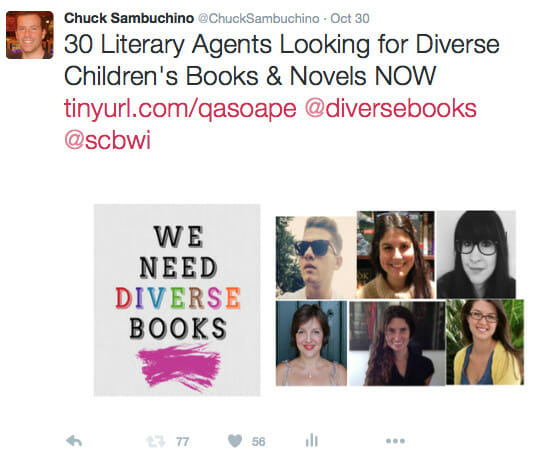
Recently, I spent a lot of time researching literary agents who were actively seeking children’s books and novels with diverse characters. Compiling the post took me days of work and a lot of emails. It was a special post that I wanted to share.
Let’s examine three different ways I could share it through my own social media networks:
Examine tweet possibility 1:
In my opinion, status updates like “Check out my latest blog post” or “New blog post is up” are the worst. They’re lazy, and don’t offer a new connection any reason to click. They’re lazy, and show someone who wants to exert no effort in gaining new followers.
Grade: F
Let’s try again with tweet possibility 2:
At least with this second tweet, you understand a little about what the blog post covers. But still, the tweet is scant and doesn’t provide absolute clarity on what lies on the other side of the click.
And did you notice the grammatical mistake? Those extra words are a sign I was rushing through the composition of the tweet, and not sculpting it carefully. Poor proofreading reeks of unprofessionalism, and will turn off prospective followers.
Grade: C
Let’s try again with tweet possibility 3:
The tweet is optimized from top to bottom to gain the most shares and attention. Look at what it does well:
It provides absolute clarity by explaining exactly what the blog article is about.
It includes simple tricks to add sexiness, like a numbered list in the title and a capitalized “NOW” to show the post is important and timely.
I added Twitter handles for users who may enjoy spreading this information. You can also use hashtags to loop in new groups of people.
I added images. People love images with blog posts and social media status updates. Images bring a post to life.
Seventy-seven retweets for this tweet is great, especially considering I had already mentioned this post several times before on social media
Grade: A
More Examples
Let’s look at another example. Notice the evolution in incentivizing, and how each version is superior to the last.
Tweet possibility 1:
Tweet possibility 2:
Tweet possibility 3:
The third tweet works so well because it doesn’t just reach out to writers. It specifically reaches out to the types of writers this agent wants to meet.
The specifics here help the tweet, and if you happen to be a writer who is composing one of the types of book I mentioned, then this post is like a lightning bolt that says, “Click me, I have value, click me, I have value.”
[twl_reusable_block post_id=41455]
Advanced strategy: Form a Twitter power crew
When you mention your blog posts on social media, what you really seek is reach and amplification through sharing.
If 2,000 people share your post and it goes viral, it reaches many readers and thus its amplification is great. Meanwhile, if you only have 50 followers on Twitter, and you tweet out news of your post, it may not get very far.
So why not work with others? Find other people and groups and form a Twitter power crew. You can all tweet each others’ posts and everyone’s amplification rises together.
You scratch the backs of others, and they return the favor.
2. Create valuable posts that will naturally get shared
Promoting your own work isn’t enough — you need others to share it, too. When a blog post gets shared on social media, you get more people to read the post, and turn some of those new readers into consistent followers who get to know you and your brand.
Ideally, your columns will spread organically from people you don’t know sharing your post. The best way to do this is to create a post that has value.
Most blogs never achieve success because the blogs provide no true value. A good blog post can make your life easier, inform you, entertain you, make you laugh, show you things or places you want to see, or cull information into a single source.
Creating a valuable blog is difficult. It takes a plan, time, and hard work. But if you spend the time to create something unique and valuable, then people will share it. Make posts for others, not for you. The example I use commonly is this:
If I took my three-year-old daughter to the park, would you care? In other words, would you read a blog post about how I took her to the park? No.
But what if I spent a month taking my daughter to some small, out-of-the-way parks, then composed a blog post called “The 5 Best Family-Friendly Parks in Cincinnati You Didn’t Know Exist (and Where to Park the Car).”
If you live by me and have kids you would take note of it — and it’s because all of a sudden the post has value for you, not me. The post took me time and energy to create, but it pays off when parents share the post with their friends.
It’s very simple. If you create something that’s just plain good, people will share it.
What tips would you add for connecting with potential blog readers through social media? How have you become a successful blogger?
This post has been updated. We regularly update our posts to make sure you have the best content. Also, this post contains affiliate links. That means if you purchase through our links, you’re supporting The Write Life — and we thank you for that!
Ready to Learn How to Gain More Followers Thru Social Media?
In a long-ago golden age, all a writer had to do was write; he churned out pages, presented them to an editor, and let others worry about promotion and advertising.
Those days are long gone.
Today, writers must be their own most ardent advocate, marketer and promoter. Self-promotion is as integral to writing success as any tool in the writing toolbox. In this post, we’ll look at five marketing strategies that will help you gain more exposure as a writer.
We all know the importance of self-promotion, yet many of us are horrible at it. We’re conscientious in every other aspect of our craft. We outline, we carve out time to write, we edit and do everything else we can for our work to stand out. Except self-promote.
For some fortunate writers, self-promotion is as natural as breathing. For others (especially introverts like me) it’s a daunting task, but one that must be done, and done well.
To advance our careers, we’re expected to promote ourselves unabashedly. The authors whose books get published – once accepted as a reclusive breed – are now vetted by publicists to make sure they’re talk-show ready.”
If you’re a natural introvert, it’s probably not in your nature to draw attention to yourself. Sure, you’re able to take the spotlight when you absolutely have to, and you’re probably good at it when you do, but you’re much more comfortable working behind the scenes.
Nurture
Some of us are raised not to stand out, so we struggle to post that Facebook update about the great review we just got or tweet about our book being on sale.
I’m Jamaican, and contrary to what our reputation might be, Jamaicans are actually a fairly conservative people. Usain Bolt notwithstanding, we’re not raised to toot our own horns — it’s one of the byproducts of the Quaker influence on the island. Those of us who’ve grown up trying to fit a reserved ideal often have a hard time sharing and promoting our work.
Plain old fear of rejection
No one wants to put themselves out there and hear only crickets. We all, in some way, want the approval of others, so when we share our work and get a negative response — or worse, no response — it’s painful. So, we think, why do it all?
Worry about competition
Indie publishing has opened the door for many writers, and the competition to make yourself heard is intense. It’s hard and often discouraging work to differentiate yourself from all the other voices clamoring for attention. When you try, sometimes it leads to…
Burnout
Marketing and self-promotion is hard work even if you enjoy doing it. For those of us who don’t, just the thought of it can raise our stress levels, so we put it off. Then, when the time we’ve grudgingly carved out comes around, the task is so utterly unenjoyable that we burn out quickly and do the bare minimum.
So how can we make self-promotion easier?
1. Create realistic self-promotion goals
If you’re a serious writer, you’re no stranger to creating goals. From finishing a chapter to hitting a specific word count, setting realistic goals is second nature. So what makes our marketing goals different? I’ve spoken with writers just beginning their promotion efforts whose goals included:
Add 100 Twitter followers in a week
Increase sales 4 percent in a month
Build and promote a Facebook fan page and get 50 likes per day
Strictly speaking, none of these goals are impossible, but for first steps, they’re pretty lofty. Instead, set more attainable goals, such as:
Tweet your book/article/reviews twice per day
Submit your book to three review sites per week
Once you achieve these goals, set the bar higher for the next round. Achieving modest goals gives us the confidence to attempt harder ones while avoiding the burnout we feel when our goals are overwhelming. (Click to tweet this idea.)
Ignoring the deep analytics available for your Facebook fan page (and other platforms soon) is the equivalent of stepping into the ring without even having watched a video of your opponent during a fight.”
Even if you’re just beginning your promotion efforts, getting familiar with those tools will give you a huge leg up, allowing you to fine-tune your efforts. Is Instagram not working for you? Drop it. Is Twitter driving sales? Tweet more often.
Whatever the case, concentrating on the platforms that work for you is not only smart, but will keep you motivated as you reach more and more readers.
3. Don’t reinvent the wheel
Chances are your social media feeds are full of people giving great advice about self-promotion, so you don’t have to come up with a plan from scratch. Research how the experts are doing it, then use their tried and true techniques to jump-start your own marketing efforts.
4. Use available tools to your advantage
It’s strange, but sending a tweet or posting a Facebook update about my work in real time is intimidating. It’s much simpler to write my promotional tweets and set them to go out in advance.
To do this, I use Tweetdeck and Buffer. In addition to being solutions for my real-time phobia, they save time, as I can set my tweets and updates and forget them.
5. Shift your focus
In my 9-to-5 career, I’m a Director of a department for a NYC consulting firm, and I constantly present on behalf of my clients. I’ve spoken before senators, commissioners, council members and community groups (often hostile ones), and I’m never flustered. Why?
Because I treat what I do like the business that it is. My career, as important as it is, isn’t held as close to my heart as my writing.
Shifting your focus to seeing your books as commodities to be sold as opposed to the work you hold so near and dear to your heart may help to remove the personal aspect from the equation, thus making promotion easier.
How do you feel about self-promotion? What marketing strategies work for you? Tell us below in the comments.
This post contains affiliate links. That means if you purchase through our links, you’re supporting The Write Life — and we thank you for that!
This is an updated version of a story that was previously published. We update our posts as often as possible to ensure they’re useful for our readers.
By now we’ve all heard about author platform, even if we’re not entirely sure how to build or maintain one.
But in my everyday work with authors, I’ve noticed many writers aren’t sure how exactly to get started. What should you focus on when you’re being pointed in 20 different directions, and all roads are potentially huge time sucks?
How to start building your author platform
As I explain in this post, author platform includes these components: expertise, contacts, social media, previous media, previous books, personality, existing readership and ability to execute. That breakdown can function as a roadmap for anyone who’s trying to figure out how to get started, especially if you feel like you’re starting at zero.
Ready to build your author platform? Here’s how to start from scratch.
1. Expertise: Write an “I am fabulous” statement
The goal with this step is to pump yourself up. In what specific and particular ways are you awesome? Why are you the person to write your book? Why is it the case that no one but you could write your book? What unique experience do you bring to the table?
Even if your answer is simply that you lived the life you lived — and maybe it was a hard one — you’re awesome for having survived it. If you write fiction, your book likely involves themes or situations you know a lot about, which makes you an expert.
Let your statement be free-flowing, but work hard to pat yourself on the back. While many of us tend to undervalue our abilities,the first step toward being an expert is believing you can be an expert.
You may have to fake it till you make it, and your “I am fabulous” statement can give you the motivation and validation you need to get there.
2. Contacts: Put together a “big mouth list”
Everyone you know is a contact. The more people you know, the more influence you have, especially if you know people in high places.
So what if those influencers are a couple degrees of separation from you? People are surprising in how they choose to support fledgling authors. I’ve witnessed seriously established authors supporting new writers just because it feels good, and they remember what it’s like to be in your position.
In addition to the list of people you’re connected to, create a list of people who might blurb you, from realistic to pie in the sky. Who would be your ideal reader? Who do you dream might one day recommend your book?
3. Social media: Pick just two social channels
That’s right: only two. Set up a profile on each and post once a day.
For most writers, I recommend choosing Facebook and Twitter, but if you’re into other channels or options, give them a shot. If you’re writing something that lends itself to images, join Pinterest. If your work lends itself to video, do YouTube. Experiment to find a social media channel that works for you and your writing.
The key to social media is posting regularly and engaging people. You want shares, because shares lead to more follows. Rather than spreading yourself thin across multiple platforms, focus consistently on the two platforms that provide the most value to you and your work.
It takes forever (seriously) to build up a following on social media, so don’t be discouraged. Celebrate a few likes a week. Manage your expectations. Keep going. Building an author platform is a marathon, not a sprint.
[twl_reusable_block post_id=41455]
4. Previous media and books: Publish an ebook
If you’re starting at zero, you may not have any previously published books or media, like guest posts or podcast interviews. That’s okay.
If you’re working on a book project that you know is going to take some time to complete — a novel or a memoir that’s already been in progress for a few years, for instance — then write a shorter ebook!
It’s surprisingly easy to self-publish an ebook. You want it to be high quality, with great content, a compelling cover and a well-designed interior. Using Amazon, Barnes & Noble, Kobo, iBooks, or e-junkie you can promote and sell your ebook from your website. While marketing your ebook is a topic for another post, figuring out how to write an ebook is a fairly simple process. And voila, you have a book to propel future books.
Media opportunities will come, but any interview you do, blog post you write or opportunity to speak in front of people you come across qualifies as media. Don’t be afraid to showcase these successes on your website and social media channels.
It takes a major shift in consciousness to start self-promoting, but I’ve found the key is in the balance. It’s cool to self-promote if you’re giving your readership fantastic, smart and interesting content — providing value. And it will get more comfortable with practice, I promise.
5. Personality: Figure out your persona
Jeff VanderMeer’s Booklife helped me understand the value of figuring out who you are online.
Some people put it all out there and are wholly themselves online, while others choose to create a persona different from who they are in real life or only show a certain side of themselves. You get to decide, and you’re not wrong or weird or bad if you want to retain a little privacy.
However, being private or an introvert does not mean you should not have a website, or that you can get away with pooh-poohing the importance of an author platform.
It just means you get to set boundaries. Instead of holding technology in contempt, learn to work with what you might not like, and to figure out how to make it work for you.
6. Existing readership: Create an email sign-up form on your website
What? You don’t have a website yet? OK, the first step is to set up your new site. Here’s a guide on how to start a blog.
While you’re at it, create a sign-up form that connects to an email management system; here are a few of our favorite email newsletter platforms to choose from. Put it on your homepage to capture email addresses — and take a deep breath.
Authors often tell me that people they know already have too much email. Get over it. Seriously. Your job is to collect emails, and to send out worthwhile content. It may take a long time to build up your email list, and to figure out exactly what your message is, but you need to practice having a following.
It doesn’t matter if you launch your email list with 20 people on it. That’s exactly what I did, and four years later I’m publishing for 5,000 subscribers who want to hear from me. After all, if they don’t, they can opt out.
But don’t worry about the numbers for now. Just take the first step and set up the form.
The ability to execute, like personality, is sort of a “soft” aspect of author platform, but it matters. It’s about follow-through and the ability to stick to a commitment to create content. It’s about consistency, and showing up even if it seems like no one is listening.
Building an author platform is grueling work, but it’s truly rewarding when you see the occasional spikes in engagement or new followers, or the payoff in the form of positive feedback or sales.
This payoff can only happen if you execute a plan and stick to it.
I know it’s a long haul. I’m out there myself, working on my platform every day, sometimes wondering why I am putting so much effort toward all this personal branding. But if you want to publish, and if you want readers, you have to find a voice, write content, connect with your readers and put yourself out there.
Your hard work will pay off; it just takes some time. Give it time and figure out a schedule that works for you. I recommend blogging once a month and posting on social media once a day, to start. You might increase from there, but again, you can take it little by little and adjust your plan as you figure it out.
The best way to build an author platform is simple: start
Just like you don’t run a marathon without training for weeks or months, you don’t start your author platform full force. Building your platform takes discipline and hard work, but if it weren’t worth it, no one would be doing it.
The key is to find genuine value in your endeavors. Keep going, even when it feels like no one is listening. Eventually people will start to listen, and eventually you will get a comment to a post that makes you realize you’re making a difference, reach a milestone with your contacts that surprises you, or connect with a high-profile writer who supports you just because.
Have faith. Work hard. Don’t dismiss these ideas just because they feel like too much effort, or because starting from zero seems daunting. Everyone started from zero, even your literary heroes. And it’s only with hindsight and effort that anyone has the wisdom to promise that it’s worth it.
I promise, it is. Come on in and test the waters. Wade in slowly. You’ll find your way.
What was the first thing you did to build your author platform? If you’re just starting out, what’s your biggest obstacle?
This is an updated version of a story that was previously published. We update our posts as often as possible to ensure they’re useful for our readers.
With so many social media outlets available, and many of them much more popular, LinkedIn flies under the radar for freelance writers.
LinkedIn is largely thought of as the professional’s social media network, but freelancers (myself included until I learned better) generally think LinkedIn is for the professional looking for full-time work only. Wrong.
Not too long ago, I wouldn’t have thought of using LinkedIn to find freelance writing gigs. Now that I know better, I regularly use LinkedIn to connect with businesses looking for writers, and the leads just keep coming.
Here’s how to use the professional network to get more assignments.
Start with your network
Most people have at least 100 connections on LinkedIn.
Those connections are probably a mix past business colleagues, friends and family, and people you don’t actually know but are in similar professions.
Have you ever thought of asking those connections for an introduction to a publication or business you want to write for?
I have 312 connections. Of those connections, I might know 75 of them personally. But when I search for a company or a business I want to write for, most of the time one of my connections is also connected to someone at said business or publication.
This provides the perfect opportunity to leverage my network to make a new connection.
Most would agree, knowing someone who knows someone is better than a blind pitch. LinkedIn, as Carol Tice, long-term, successful freelance writer told me me in a mentoring conversation, “This is the one place where asking your network to introduce you to a new publication or business is acceptable.” In fact, she’s been hired by Fortune 500 companies through LinkedIn.
It’s the professional’s social media network for a reason!
So how do you do this?
In the search bar, type in the company or publication you’re interested in writing for.
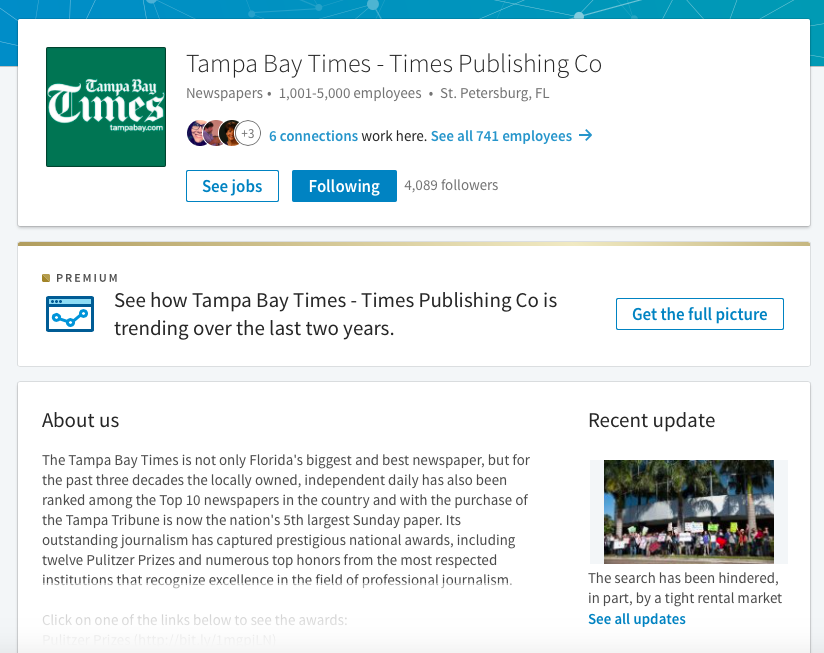
Pull up the company page and see if you have any connections in common.
Click on the blue link that tells you how many connections you have in common, and choose one of them to reach out to.
Reach out to one of them directly, and send a quick intro (not a full-fledged letter of intent or pitch) through the messaging option. You can ask if they know who you’d contact or if they’d be willing to introduce you through email to someone.
Ever looked up a marketing manager or editor and noticed you had connections in common?
Another way to use your LinkedIn network to your advantage is to ask for an introduction to the person you’re trying to connect to.
Use InMail
Did you know you can try LinkedIn Premium for 30 days for free?
Sign up for a trial and use the 30 free InMails to get your name out there to businesses you want to work for.
LinkedIn makes it really easy to find marketing managers and editors with its intuitive search features.
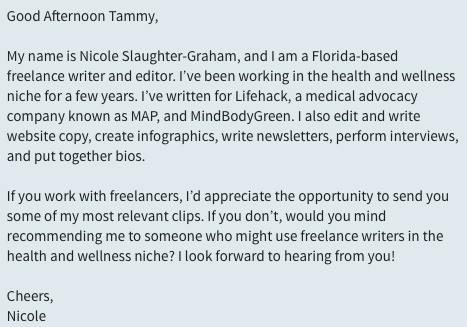
When sending InMail, a quick introduction rather than a detailed pitch is best. Send a little inquiry letting the prospective client know about your experience and your services.
This is what mine looked like:
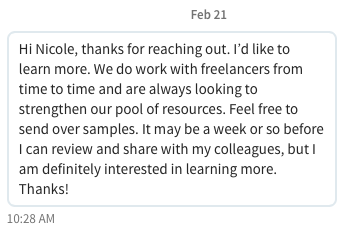
About three weeks later, I received a response that went a little something like this:
The easiest way to use InMail in volume is to narrow down your niche. I chose higher education and health, because those are two of my favorite topics to write about. Then, I used the LinkedIn search feature to search marketing managers in those two niches. This helped me narrow my results so I could choose who to send InMail to.
Become a LinkedIn Pro with ProFinder
A relatively new feature, LinkedIn ProFinder connects freelancers with clients. It’s easy to get started, and the results can be pretty great.
Just click on the “Join as a Pro” link in the top right-hand corner of the LinkedIn Profinder page and fill out the prompts. You are able to select the services you provide and once approved, ProFinder will connect you with businesses submitting jobs that match your skills.
I signed up for ProFinder and about a week later, I found out through email I was added to the ProFinder network. Not two days after that, I received an email for my first lead.
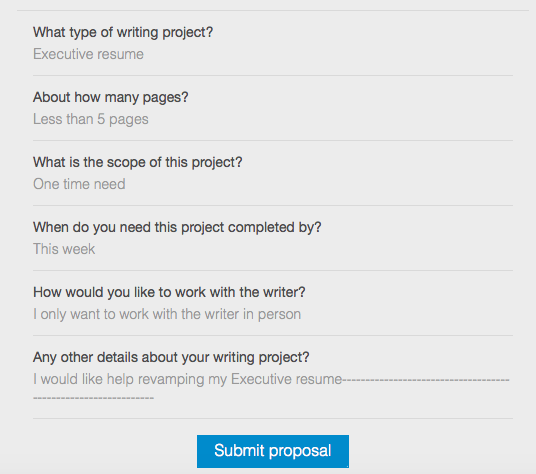
The leads include everything you want to know about the project, and you will be invited to submit a proposal.
It will look a little something like this:
If the job is something you are interested in, go ahead and submit away! In the proposal, you will write a brief cover letter and submit an hourly or project rate.
Since I started with ProFinder about a month ago, I’ve been notified of five projects, submitted proposals for three of them, and been contacted for two interviews. I’m still in conversation with one of the prospects and have already signed a contract with the other.
Definitely worth the time!
Even if you aren’t keen on using social media to find freelance gigs, think of LinkedIn as more of a networking tool.
It really is a goldmine if used to its full potential.
Have you used LinkedIn in your freelance business? What techniques work for you?
You write blog posts because you want links to your site to spread across the internet, right?
If people share your posts on social media, that means more traffic to your site, more conversions and more profit. (Ideally!)
But how do you get people to share your content?
Obviously you have social share buttons somewhere on your site. You might even include a call-to-action at the end of your post to get people to share it.
But is there more you can do to optimize your blog posts for social sharing? Yep!
Here are just a few tricks to getting more social shares.
1. Use Click to Tweet links
Click to Tweet is a service that allows you to create custom tweets.
Users simply click the link, and it opens a Twitter window where they can easily tweet the message you’ve prepared for them. (They can also edit and personalize the message before tweeting.)
So let’s say you shared an awesome statistic or said something worth quoting.
Place that in your custom message with a link to your blog post and your username, generate a link, and insert it into your post with anchor text like, “Tweet That Stat!”
Click to Tweet allows you to try the service for free, or you can upgrade to track your link activity of unlimited links.
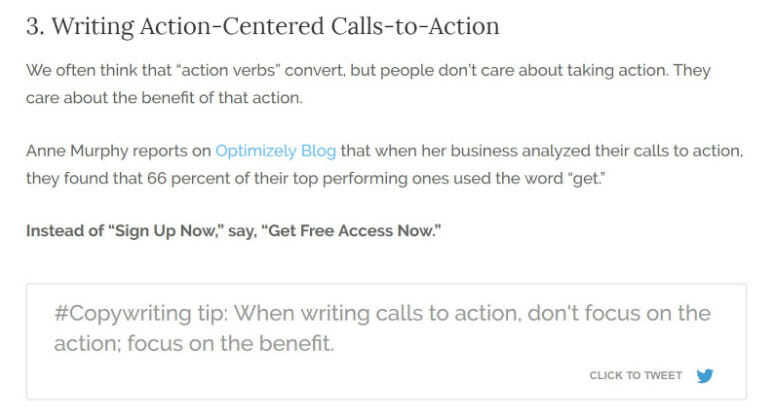
Personally, I use the social sharing WordPress plugin Social Warfare. They have tons of amazing features, including a built-in Click to Tweet function. But what makes them better is that you can choose from a variety of styles to make the tweet stand out and get more people to share it.
Plus, you can easily set up the custom links right from your WordPress dashboard.
Here’s what it looks like in a real blog post:
The actual tweet that goes out includes the message plus the link to the blog post and your username.
This is a great way to drive shares because it doesn’t take much effort on the reader’s part, and it gets them to share thought-provoking messages while you have their attention on that specific topic.
Tip: When creating custom tweets, you can include a link to a photo on Twitter, and that picture will show up in the tweet. Here’s how to create custom tweets with images.
2. Enable pin-it buttons on images
Pinterest is a great social network for attracting new readers, especially if you’re writing about visual topics such as beauty, crafts, interior design, or cooking. (Other industries can drive traffic through Pinterest, too, so don’t write it off just because you’re not a food or beauty blogger.)
To make it easy for readers to share your featured image or other visuals scattered throughout your post, add a Pinterest button to your site that appears when you hover over the image.
If you’re on WordPress, it’s easy! Simply install any Pinterest Pin It button plugin, configure your settings, and you’re good to go!
All that said, you want to make sure you’re using high-quality images that will entice people to share on all social networks.
Not only will this increase direct shares of your blog posts, but your posts will perform better on those social platforms. If you’re on a budget, it’s easy to find free images on sites like Pexels or Pixabay and customize them with software like Canva.
3. Optimize your title and meta description
When someone shares your blog post on Facebook, LinkedIn, Google+, or other social platforms, the site automatically pulls the title and meta description for the post.
That means you have to optimize this information for social media.
Make sure your blog post headline is catchy and short. If it’s too long, users won’t see the full title. You usually want to stick with less than 70 characters in your blog post title.
The same is true of your meta description. However, it can be longer than the title, so it gives you some more room to capture people’s attention. Meta descriptions are usually 155 characters or shorter.
A plugin like Yoast SEO makes it easy to add meta descriptions. Keep in mind that your title and meta description will also show up in search engine results as well.
If you want something different between search engines and social, there is a way around that.
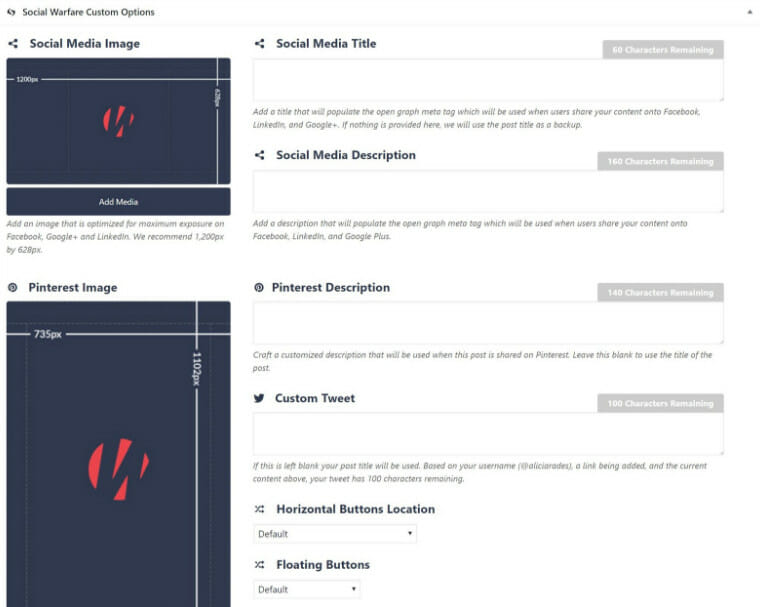
I mentioned Social Warfare earlier. The plugin actually lets you add a custom social media title and description separate from your other metadata so you can further optimize your posts for social sharing. It’s worth checking out if you’d like the versatility to customize your messages for social media.
Here’s what it looks like in WordPress:
By drawing attention to social sharing through Click to Tweet links, making it easy to share on Pinterest, and optimizing your metadata for maximum social impact, you should see more social shares from your blog and traffic to your blog.
Which social sharing tool mentioned here will you use first?
Wondering how to market yourself? When you start a business as a freelance writer, you’re bound to make some mistakes. No matter how many advice columns and guides to freelancing you read, some lessons on how to market yourself can only be learned in the trenches.
I’ve made many blunders since launching my side gig as a freelancer: letting a pitch sit so long without followup that it’s gotten cold, not keeping my social media voice consistent, not making myself stick to a writing schedule, and more.
Here are a few of the big mistakes new freelancers tend to make, errors that keep writers from landing the best freelance gigs — so you’ll have a better chance of avoiding them before they bite you.
1. Scattered, inconsistent presentation
How to market yourself well comes down to every foothold you have on social media being consistent.
How confusing would it be if you liked a brand and decided to find out more about it online, only to discover all of its profiles were different?
Its website was recently rebranded under a new name, one of its social media accounts was full of misspellings, and another account’s latest post was in 2011.
A lot of freelancers treat their personal brands in this haphazard way, rather than making every platform work together to attract clients.
The fact is that if you don’t make yourself easy to find, customers won’t take the trouble to hunt you down. And if your offerings aren’t clear, they won’t hire you. Making the message on all your profiles match eliminates confusion and helps you turn inquires into solid leads.
If your online persona is so fragmented that every account looks like a different person, remedy this by choosing the same professional profile picture and pithy bio for every site.
Narrow your social presence to just a few sites, like your personal website or blog, LinkedIn and Twitter.
Kristi Hines (known on Twitter as @kikolani), has this down pat with her professional presentation and focus on content marketing. Sports writer Nick McCarvel (@NickMcCarvel) is another good example of consistency. He injects some personal observations and colloquialisms into his Twitter commentary while keeping it businesslike in his commentary articles.
2. Random posts and self-promotions
Posting and sharing without any sort of master plan on how to market yourself lessens your chance of attracting good work.
If you miss direct messages, share little about your industry (other than pleas for someone to hire you), and frequently pop off with curses or squabbles, you’ll alienate potential followers and limit your credibility in marketing yourself.
For a more tactical approach to social media, start by figuring out when your followers are most active online, and how wide your reach already is. This will help you determine how to market yourself in the best way possible.
Free monitoring tools can also help with this part. You’ll want to schedule most of your updates for those windows when your followers tend to be online.
If you don’t think you can come up with something to say every time, start a backlog of drafts that you can release when traffic is high. The frequency with which you post will depend mainly on how often you feel you can say something substantial and relevant.
When it comes to how to market yourself, it’s better to have a few consistent, quality posts than a full timeline that just sounds like you’re making things up as you go.
Once you have a basic posting schedule arranged for maximum engagement and an understanding of the tactics of each platform, you should decide exactly what your take on the market should be:
Will you position yourself as an expert, here to inform?
A learner, posting about your journey as you gain familiarity with the industry?
A skeptic, scrutinizing everything you see and sharing how it could have been better?
Whatever angle you choose, keep it in mind when selecting your brand voice.
The only thing worse than tacky self-promotion is no self-promotion. Don’t be so falsely humble that you never actually say how good you are at writing, and what you can offer to others.
Check out Graphic Design Blender’s guide to promoting yourself without tearing others down, being outdone by bigger competitors, or overlooking valuable opportunities.
Some of their suggestions include promoting yourself offline through strategic relationships and impressive print pieces, and being specific about what you bring to your market niche.
3. Irregular networking
Networking is tough. Whether you’re a designer, a writer or an editor, we all experience similar struggles in knowing how to market yourself. But these few tricks can make networking easier.
First of all, be bold. Go for the clients you want; don’t just send up little online flares and hope your dream collaborator sees one. A short email introducing yourself and explaining that you’d love to help with any work they have in your field is entirely appropriate. Here’s how to write a tasteful pitch.
Don’t assume your family and friends can’t help you just because they aren’t familiar with freelancing. Take time to explain what exactly you do, and they may just know someone who needs your help. “Freelancing” may come across as a lofty concept; they might understand it better as “working with whoever needs you for a one-time job.”
Don’t overlook your local market. Dozens of businesses nearby may need you to write copy for them, but they can’t hire you if they don’t know who you are. Chamber of Commerce and similar memberships can offer valuable local connections.
Stay humble. Don’t strike out on your own so confident in your previous experience and market knowledge that you don’t think you’ll need help from an old coworker or industry expert. Seek out advice from former connections to show that you still value your relationships with them.
When networking, the number of inquiries you get will be directly related to the effort you put into making people see you.
4. Unfamiliarity with competitors’ strategies
In any business, you’ll have competitors. This isn’t much of a concern when you’re a nine-to-fiver, particularly at a national company where your salary is mostly safe.
As a freelancer, though, you are the company, and your salary is directly tied to how well you outdistance your competitors. If you’re unaware of current trends, the myriad of other writers who do exactly the same thing as you will snap up available jobs because of their greater savvy.
One of the most effective strategies is to study the competition. See how they weave their voice into their posts, both on their own platforms and in the work they’re hired to do. Take note of any mistakes they make, and identify how you could do better.
Going even farther than that, you could try befriending other freelancers in your space. Send them a message offering to meet up (if they’re in your area) or chat online to share ideas, talk about potential collaboration and share tips on how to market yourself.
Guest posting for each other’s blogs could help both of you, so that’s an option, too.
What other mistakes should freelancers avoid? Let us know what you’ve learned the hard way during your time flying solo. You may even make some friends in the comments!
We’ve all felt it. The tightness in the chest. The feeling otherwise known as panic that sets in upon a book’s release. Will anyone buy it? Will people enjoy the stories we’ve poured our hearts into?
We want to shout from the rooftops to celebrate releasing our work into the world, and we’ve heard that Twitter is a crucial part of a marketing strategy, and so we tweet, @mention and retweet. Yet how much should we say before all of our promotional efforts start to fall on deaf ears?
Is there such a thing as too much Twitter promotion?
Don’t start by selling
Before you try to convince readers to buy your book, your goal as the author should be to build trust and a relationship with them. You can build trust with readers much like you build trust with anyone else. Start by finding a common bond, sharing information about yourself and letting others know what you like.
Find topics to talk about apart from yourself and your books. Current events, fashion and food are often good choices. Talk about your favorite television shows, books or musicians.
Show your personality. If you’re funny, don’t be afraid to show that side of yourself online. People respond to people they relate to, and being relatable is how you will attract your audience.
Pay attention to your tweets, the @replies, the number of favorites or retweets. Note the ones that attracted a good response from your audience, and write more of that type of post.
Learn the difference between hard selling and soft selling
The truth is, if you know the difference between these two types of promotion, you can share information about your book daily without making your audience and readership feel “sold to.”
A hard sell is a direct, “buy my book” type of message. It can be an aggressive strategy and is usually reserved for products that are hard to sell.
Instead, you’ll want to master the art of the soft sell, a technique that relies on “suggestion or gentle persuasion rather than aggressive pressure.”
Soft-sell marketing is subtle, persuasive and low pressure. The goal of soft-sell marketing is to build a relationship without aggressively pitching your book to readers.
Once you’ve created a relationship with your audience, selling will feel less forced, more natural and conversational. Soft-sell marketing is effective because the author creates a lasting bond with her readership.
If your audience connects with you, and they like you, they will buy from you. It’s that simple.
Is there a magic formula for promotion?
Some writers are always on the hunt for a magic formula. How many tweets should I post each day? What time of day should I focus on social media?
Yes, there are ways to help grow your social media following, and there’s a lot of great advice for what to do (and not to do) on social media. However, if you build a rapport with your audience, you can tweet as much or as little as you like, and still be effective.
[bctt tweet=”If you build a rapport with your audience, you can tweet as much as you like,” says @jenniferafusco”]
Take a look at Laurell K. Hamilton (@LKHamilton), an author who tweets frequently. She’s both conversational and engaging with her audience. By looking at her posts, you can tell she’s having fun on Twitter.
Romance author Molly Harper (@mollyharperauth) is also very effective on Twitter. She doesn’t tweet often, maybe once or twice a day, but her humorous personality shines through in her tweets, delighting her audience.
How to soft sell on Twitter
To illustrate the difference between hard selling and soft selling in tweets, let’s compare two sets of tweets from New York Times bestselling romance author Tawny Weber.
The first three use a hard-sell approach:
How’s Mission: Fake Engagement going to go? Find out in A SEAL’s Kiss [link] #SexySEALs
Hot, sexy and brooding… Check out Brody Lane in A SEAL’s Salvation! #SexySEALs [link]
#FREE A SEAL’s Surrender by @TawnyWeber: [link] #free #HarlequinBlaze #kindle #nook #ibooks
Here are the same tweets, rewritten to incorporate a soft-sell message:
OMG, A fake engagement. A SEAL’s Kiss [link] #SexySEALs Would you ever fake an engagement?
Like hot, sexy and brooding heroes? I’d love to know what you think of Brody Lane. [link] A SEAL’s Salvation
A free book? Yes, please. #FREE A SEAL’s Surrender [link] #HarlequinBlaze #kindle #nook #ibooks
See the differences? The second set of messages use a friendly tone. The tweets are conversational in nature and the purchase of the book is implied without the use of hard selling.
To write great soft-sell messages, read the tweet aloud. If you feel the message says, “buy my book”, rewrite it.
Create soft-selling tweets with the goal of starting a dialog. Use hashtags to invite others to join the conversation. Your soft-sell messages don’t always have to include buy links or book related tags.
Apply the same concepts to other social media channels
Prefer pinning to tweeting? That’s OK.
While I’ve focused on Twitter, you can easily apply the idea of building a rapport with your readership and using a soft-selling on Facebook, Pinterest, Google+ or wherever you prefer to promote your work.
If you’re vigilant about keeping your social media conversations light, entertaining and engaging, and you in the effort in to build a bond with your readership, you won’t have to worry about how much promo is too much. Instead of being a burden or nerve-wracking endeavor, promotion will seem natural and effortless.
How do you share your work on Twitter without being overly promotional?
Want to use Twitter to make connections for your writing career? Check out our founder Alexis Grant’s course: Become a Twitter Power User.
It’s not easy, convincing writers on the value of Twitter. But once the social network begins to make sense to you and you start seeing wins on a regular basis — a publisher links to your blog post, a literary agent responds to your tweet, or maybe you even land a freelance gig through a Twitter connection — you’ll never go back.
Once you get over that initial hump, it’s time to take it a step further, so you see even more return on your investment. And that’s when you want to make sure to follow the advice below. Will these mistakes doom you forever? No. But they will keep you from turning your own Twitter world into a place where you meet clients, form friendships and cultivate your writing career.
Here are four mistakes I see writers make on Twitter and why you should be sure to avoid them:
1. Neglecting to include @mentions
Adding @mentions is one of the smartest things you can do to grow your Twitter presence, the best way to get a big bang for your buck on this social media channel. For every single tweet you send, look for ways to incorporate an @mention, maybe even two.
Mention a blogger? Look up that person’s handle and include it in your tweet. Sharing a link from a publication? Add that @mention to your update. Notice someone is simply mentioned in the article you’re sharing? Find a way to work their handle into your tweet, too.
The @mention is your way of getting the attention of other people, of saying, “Hello! I exist, and I’m tweeting about YOU!” If you fail to include the @mention, that person or publication or organization you’re tweeting about will probably never see what you have to say… and in that case, is your time spent on social media even worth it?
2. Overlooking the power of Twitter lists
After the @mention, lists are one of the best ways to get the most out of Twitter — and yet so many people don’t use them. Lists help you filter through all the noise on this platform and hear only the things you want to hear — so you can create connections that matter. (Here’s a great how-to-use-lists guide from Mashable.)
One of my favorite ways to use Twitter lists is by creating what I call a Notice-Me List. This is a private list that includes lots of people I’m hoping to form a relationship with on Twitter: bloggers, publishers, writers, social media strategists, etc. Anytime I come across someone who I want to know me, I add them to this list, which means the list is always changing.
But it’s what you do with that list that counts. Once you’ve created it, take a few minutes each day or week to scroll through that list and look for ways to interact with people on it. That could mean @replying to their tweets or RTing their tweets with a short comment, or even clicking through one of the links they share to their blog and leaving a comment on the latest post.
[bctt tweet=”Creating Twitter lists is great, but what you DO with those lists is what really counts.”]
By interacting with these people, you’re opening the door to a relationship. If you respond in a smart way, they’ll hopefully write back. And even if they don’t respond, they might notice you and your work — which means they’re far more likely to respond to an email you send down the line.
3. Procrastinating the move to Hootsuite
If you’re not using a Twitter application like Hootsuite, Tweetdeck or Buffer, you should be.
I don’t recommend them for complete Twitter newbies, because it takes a while to understand how to use the platform, and these applications are an added complication. But as soon as you get the hang of how to make connections on Twitter — that includes using @mentions and lists to get the most of the platform — make the switch to an app. It will make your life easier in the long run!
Of these three tools, I prefer Hootsuite. But all three have loyal users, so you really can’t go wrong choosing one. If you do go with Hootsuite, watch this tutorial from Marian Schembari as a primer.
4. Thinking that scheduling tweets is a big no-no
You don’t have to be in front of your computer all day to benefit from Twitter. In fact, the best Twitter users actually schedule their tweets — that is, they create a bunch of tweets whenever they have time and schedule them to go live throughout the day or week. This is how you provide massive value — and become a tweep people want to follow — without spending all day online.
Now, there are two caveats here. The first: Just because you schedule tweets doesn’t mean you should never hop onto the platform and interact. Some of the best connections I’ve formed have grown out of spontaneous conversation, interacting with other people on the platform. That’s essential — so don’t leave interacting out of the equation.
Second, scheduling tweets is different than automating them.
Automation is when you publish a blog post and a Twitter app is set up to automatically tweet that post. Scheduling is when you create a tweet by hand, but schedule it to go live at a later date. (Click to tweet this idea.)
The main reason automation isn’t a good idea is because it’s not optimized. The tweet that goes out automatically is probably simply a headline and a link — and guess what? That violates our cardinal rule: include an @mention.
If you want to add @mentions, you have to craft tweets by hand. That also allows you to make other tweaks that will encourage followers to click on the link, like asking questions or adding a #hashtag or putting some tease into your update (aka “This story about two writers earning millions blew us away!”).
So there you have it — four tips that will help you get more out of Twitter. If you want to put the @mention rule into practice, give us a shout at @TheWriteLife. We’re always happy to make new writing friends!