Blog

  • This 4-Week Freelance Writing Course Teaches You How to Multiply Your Income and Avoid Low-Paying Gigs

    This 4-Week Freelance Writing Course Teaches You How to Multiply Your Income and Avoid Low-Paying Gigs

    Most freelance writers share the same major goal — to make more money.

    The reality is many freelancers are seriously struggling to make a go of running their own business. They have a hard time finding quality clients, and as a result, they end up turning to content mills (like Textbroker and Writer Access), gig sites (think Fiverr), or even low quality job boards (Craigslist and the like).

    Industry veteran Carol Tice, founder of the Freelance Writers Den, has seen it all a million times. For years, she’s been coaching freelancers on how to build a thriving business where they can make real money and avoid the stress of wondering if they’ll be able to pay this month’s bills.

    Along with another seasoned freelancing vet, Linda Formichelli, Tice created Escape the Content Mills, a 4-week bootcamp where writers can learn “the step-by-step blueprint to help you start earning what you’re worth.” This is an essential online writing course for freelancers not making enough money.

    Since 2008, Carol Tice has been teaching freelancers how to grow their business on her popular MakeALivingWriting blog, and in 2011, she founded the Freelance Writers Den, a membership community with hundreds of hours of courses and training materials for freelancers looking to take their careers to the next level.

    Now, Tice is presenting Escape the Content Mills one final time, this time alongside Sarah Greesonbach, another longtime pro who has also worked with many freelancers to help grow their careers.

    Escape the Content Mills Course Details

    During this 4-week online course, Carol and Sarah will teach students how to leave behind low-paying content mills and gig sites and find quality, lucrative clients that pay respectable rates.

    Each week of the monthlong bootcamp includes the following:

    • Multiple self-paced, self-study lessons broken up into quick, easily-digestable sections for convenience
    • Live video Q&As on Zoom with Carol and/or Sarah where students will have the chance to ask questions and get hands-on mentoring from pros (full transcripts available as well)
    • Homework assignments where freelancers can apply the lessons and then get feedback from longtime writing pros
    • Access to an exclusive bootcamp forum where students can ask questions, bounce ideas off one another, and take their learnings a step further

    The course curriculum is as follows:

    • Week 1: Finding Your Niche–Helps freelancers find their most lucrative niche with a “fail-proof step-by-step guide and fillable PDF worksheet”
    • Week 2: Markets That Pay–Reveals the best freelance markets that are looking for writers and pay great rates
    • Week 3: Marketing That Works–Teaches simple, highly effective marketing strategies writers can use to attract new clients
    • Week 4: The Business of Freelance–Dives into all of the fine details of forming and growing a freelance business, including contract samples, writer website tips, and more

    Over $450 in Bonuses Included for All Students

    Students who enroll in Escape the Content Mills don’t just get access to what promises to be a career-changing course, they also get a ton of bonuses to further their training and improve their odds of success.

    There are over $450 in bonuses that will be included for every student, including:

    • One month free in the Freelance Writers Den–Everyone who enrolls in class gets their first month free in the Freelance Writers Den community. That includes access to dozens of other bootcamps, 300+ hours of video & audio trainings for writers, a members-only job board, a members-only podcast, and a 24/7 community where writers can get additional support from fellow freelancers and take advantage of networking opportunities.
    • Bonus course: 4-Week Journalism School–Registration now includes access to a whole other course as well. 4-Week Journalism School is a monthlong, self-study class that shows freelancers everything they need to know about finding story ideas, pitching editors, and delivering quality work that meets top journalistic standards.
    • Tons of extra training materials–Every student gets a ton of additional training resources, including including 4 podcasts, 7 bonus PDF workbooks, 2 ebooks, and more.

    According to the Den team, this is their “biggest bonus ever” and a deal that won’t come around again.

    How Much Is It?

    So, how much does it cost to take Escape the Content Mills?

    Here’s what the instructors have to say, “Get the full 4-week Escape the Content Mills Bootcamp, plus the massively popular 4-Week Journalism School, plus numerous bonus course materials, plus your first month FREE in the Freelance Writers Den  — well over $750 total in value — for only $297. That’s more than 60% off the full price!

    Our thoughts?

    While $297 is a significant investment, especially if you’re a struggling writer getting paid low rates, the value here is truly exceptional. Even if you disregard the hundreds of dollars of bonuses included, the content in the Escape the Content Mills bootcamp can teach you how to double, triple, quadruple, or more your income.

    In other words, it’s a small investment that should more than pay off if you implement what you’re taught into your freelance business.

    Registration Closes Very Soon

    Interested in learning more about Escape the Content Mills?

    You need to act fast. Registration ends Wednesday, May 5th at 11:59 pm ET. After that, you won’t be able to sign up. This also makes a great gift for writers in your life!

    Click here to learn more and to sign up before it’s too late.


  • 10 Google Docs Hacks That Make Writing More Seamless

    10 Google Docs Hacks That Make Writing More Seamless

    I’ll just come out and say it: As a professional writer, editor and content manager, I can’t work — no, I can’t live — without Google Docs.

    If you too are a fan, you get it. If not, here’s the quick elevator pitch: Google Docs makes writing, sharing and collaborating easy. It’s also free, and you can access your work anywhere (even without internet — see more on that below).

    Even more, Google Docs has some nifty tricks up its sleeve that’ll make your life as a writer easier.

    10 Google Docs hacks every writer needs to know

    Want to elevate your Google Docs experience? Try these 10 hacks.

    1. Tap into your revision history

    Ever write something, delete it, then feel your heart sink five minutes later because, Darn it, that actually would have been perfect? Yeah, me too. All the time. But that’s the beauty of Google Docs’ revision history. It keeps a record of (almost) everything you write.

    To tap into your revision history, all you have to do is go to: File → Version history → See version history.

    Expand detailed versions, and you’ll find minute-by-minute versions of your document. Click through to see your changes and find that pesky paragraph you want to copy and paste back into your story.

    If you’re super organized, you can also name versions of your document (e.g. Draft I, Draft II, Edited I, Edited II, etc.) so you can keep better track of them.

    2. Work offline

    If you’re traveling, Google Docs makes it easy to work offline, meaning you can work in your doc without being connected to the internet. To do this, go to your settings in Google Drive, and select “work offline.”

    This has been a lifesaver when I’m stuck in an airport with bad Wi-Fi, on a plane where I have to pay for bad Wi-Fi or even on a road trip. You can also download the Google Docs app to become even more mobile.

    Pro tip: If you’re struggling to stay focused and find yourself compulsively clicking through Facebook, checking emails, online shopping and doing everything except writing (me, way too often), then consider turning off your Wi-Fi and working offline. Even if you’re home and have perfectly good internet access, this will allow you to pseudo-unplug and limit your distractions.

    3. Self-edit with suggested changes and comments

    Sure, suggested changes (also known as track changes in Google Docs) are great for editors working with writers, but have you ever used these tools for self-editing

    Suggested changes can be particularly helpful when you’re working on a story’s organization. You can move paragraphs around here and there in suggestion mode to see what it “feels” like. If you like it, accept changes!

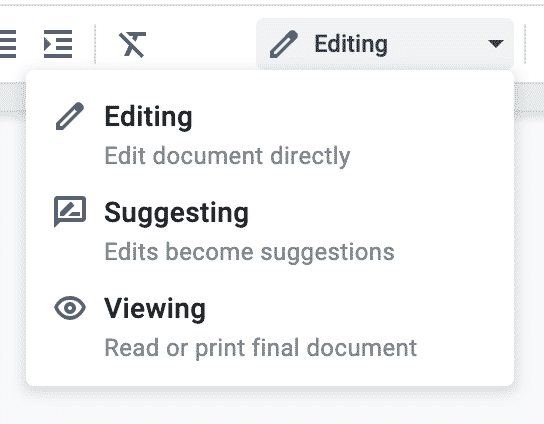
    To turn on suggested changes, select the pencil in the top right corner of your doc, and turn on suggesting mode. When you’re done making suggested changes, go back to editing mode.

    Leaving comments can also be handy. If you’re at a loss for words or need to leave a reminder to fact-check a section later on, add a comment for yourself. It’s basically a virtual sticky note. There are a few ways to do this:

    • Insert → Comment
    • Command+Option+M
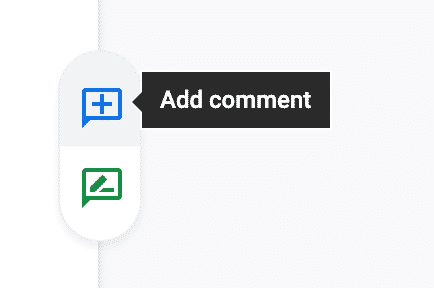
    • Highlight your sentence and click the blue comment box on the right side of your document. (You can switch to suggestion mode this way, too!)

    4. Use Google Docs Add-Ons

    Did you know Google Docs has add-ons? Think of these like a Chrome extension — they’re added features that’ll level up your Google Doc.

    To explore Google Docs add-ons, select Add-ons → Get add-ons. Or, if you’re not in Google Docs right now, just head to the Google Workspace Marketplace.

    There are dozens of add-on options, but here are a few that may be particularly helpful for writers:

    • Easy Accents: This add-on makes it easy to insert accent marks into your document without searching through that pesky special characters box or copying and pasting from Google.
    • ProWritingAid Grammar and Writing Coach: This highly rated add-on will point out spelling and style inconsistencies, help you eliminate cliches and redundancies, check your spelling and grammar, spot overused words, and more. (Note: The free version runs on the first 500 words of your doc. You’ll have to buy the premium version for more, but the reviews make it sound worth it. Here’s our ProWritingAid review.)
    • Doc Tools: Consider this your Google Docs toolbox. You get 13 straightforward tools, including easy font size change, highlight, eraser and alphabetical sorting. (Google Docs offers these features, but they’re a bit tricky to find. These are just an added toolbar!)

    5. Compare documents

    If you have two pieces of text you’d like to compare, Google Docs makes this easy. Select Tools → Compare Documents. You’ll select another Google Doc to compare your current one with.

    For writers, and especially freelancers, this may be particularly helpful to see what changes an editor has made to your published work. What you can do is copy and paste the published text into a Google Doc then compare it with your submitted draft.

    This simple hack can help you better understand — and meet! — your editor’s expectations.

    6. Cite sources

    If you’re in academia, you likely have to cite sources. (As an English major, this was my least favorite thing ever.) There are online tools out there that’ll help you with formatting — or you can just use Google Docs’ free built-in citations tool.

    Head to Tools → Citations.

    In the sidebar, select APA, MLA or Chicago style. Then, enter the material’s information and save the source. Find where in your text you need to add the citation, and select “Cite.” At the bottom of the citations sidebar, click “Insert bibliography.” Google Docs will keep this updated as you add more citations.

    Simple!

    7. Let Google type for you

    Tired of typing? Or maybe you just want to dictate some general brainstorming ideas into a doc. Give your fingers a break with Google’s voice typing feature. (ToolsVoice typing.)

    This opens a little speaker. Just click and start talking. Say “period” when you want to end a sentence or “new line” when you want to insert a paragraph break. Of course, it doesn’t always translate perfectly, but it’s a good tool to have on hand!

    8. Keep organized with a table of contents

    If you’re working on a big project, making a table of contents at the top of your document can be life-saving. This will make it easy to jump from section to section and also get a clear view of the content’s structure.

    If you’re using various headings and subheadings to break up your document (e.g. Heading 2, Heading 3), all you have to do is insert a table of contents (Insert → Table of Contents). Google Docs will automatically generate a table of contents for you, with each section of your document linked.

    You can then add more sections and customize it.

    9. Easily track your word count

    As a writer, word count is often important. Maybe you’re trying to hit a specific count for an assignment or maybe you just need to prove to yourself that you’re actually making progress.

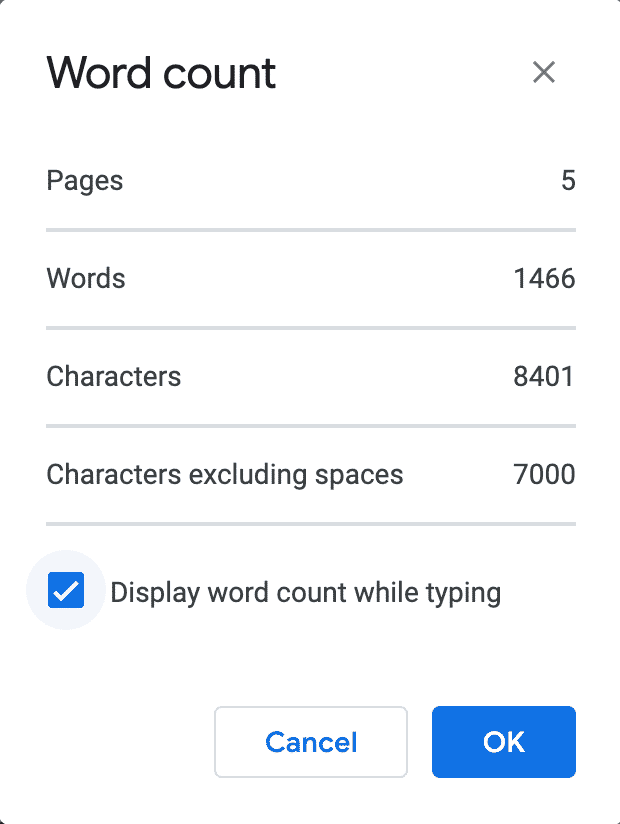
    Ever wondered how to see your word count in Google Docs without navigating to Tools → Word Count each time you want an update? 

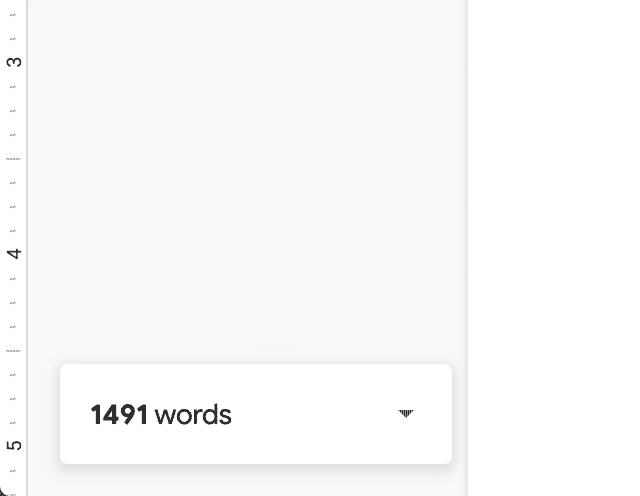
    There’s an easy hack that allows you to see your word count while you’re typing. When you’re viewing word count, simply select the box that says “Display word count while typing.”

    This opens a little tab at the bottom of your document that keeps a running update going. You can even highlight sentences or sections to see more granular word counts.

    10. Open a new doc and start writing!

    Here’s one final, life-changing tip before I send you on your way: To open a new, blank document, rather than going to your Google Drive and creating a new document, simply type docs.new into your address bar, and a new Google Doc will automatically load.

    Voila!

    This post contains affiliate links. That means if you purchase through our links, you’re supporting The Write Life — and we thank you for that!

    Photo by Armin Rimoldi from Pexels

  • This Free Ebook Shows Freelancers How to Make More Money by Ditching the Mills

    This Free Ebook Shows Freelancers How to Make More Money by Ditching the Mills

    Are you a freelancer who spends time writing on sites like Textbroker, Writer Access, Fiverr, or even Upwork?

    If so, you might want to grab this free ebook our friends at the Freelance Writers Den are giving away right now.

    It’s called Quit the Content Mills: 6 Writers Reveal How They Earn More, and like the title says, it features interviews with writers who have ditched the content mills and gig sites and started making more money from their businesses.

    The book is co-authored by Carol Tice (founder of the Freelance Writers Den and the Make a Living Writing blog) and Linda Formichelli (freelance writer and co-author of several books) — two experts who know what it takes to build a successful freelance writing career.

    What’s in the Book?

    Quit the Content Mills is a free ebook aimed primarily at new and mid-career freelance writers who are “writing for pennies” on mills like Textbroker and gig sites like Fiverr and Upwork.

    Here are some of the things you’ll read about:

    • The tactics one writer used to go from making $10 an hour to $85 an hour
    • How another freelancer 10X’d their income, going from earning $1,000 and month to $10,000 a month.
    • What one freelancer did to land a $1,500 article assignment from a client

    What Do We Like about the Book?

    Being a freelancer can be a difficult, lonely journey at times. Sometimes, you have to take on jobs you don’t want to just so you can keep food on the table, and in many cases, that leads to writing for content mills.

    The problem is it’s very easy to get so sucked into churning out one article after another for these sites that you don’t have time to market your business and strategize ways to level up your career.

    That’s why this book is so useful. It shows writers who feel stuck that there is hope and there is a way to start earning a lot more money, often while doing a lot less work.

    We found the stories in Quit the Content Mills to be inspiring and insightful, and believe this is a great read for someone looking to start on the path to building their dream freelance career.

    Only Available for a Few More Days…

    Our friends at the Freelance Writers Den are offering the Quit the Content Mills ebook totally free right now, but the offer is only available until May 5. After that, you won’t be able to get the book anymore.

    Interested in checking it out?

    Click here to grab your free copy now.


  • How to Make a Living Writing Case Studies and White Papers

    How to Make a Living Writing Case Studies and White Papers

    What are the most lucrative freelance writing niches?

    Common guesses might be website copy, direct response or celebrity ghostwriting. But time for money, I’d bet longform content at least belongs in the top three. 

    By longform content, I’m specifically talking about white papers and case studies. 

    In digital marketing parlance, these are considered “bottom of funnel” resources. That means businesses use these pieces of content to provide additional information to people who are on the brink of making a purchase. 

    Your case study or white paper is often the last thing someone reads before choosing whether to click away… or pull out their credit card. 

    As you can imagine, many B2B (business-to-business) companies take these resources very seriously. And they’ll pay a good writer handsomely to create B2B writing resources that improve their sales. 

    After working as a marketing manager for two years, I decided to strike out on my own as a freelance copywriter. And in the past five years, I’ve helped dozens of startups and established tech companies with their B2B copy, with a special focus on white papers and case studies. I’ve learned that if you’re a strong writer with some storytelling chops, you can quietly earn an awesome living just producing these two deliverables.

    What is a white paper?

    A white paper is a report that informs the reader about a technical subject. There are many use cases for a white paper. But most of the white papers I’ve written fit loosely into one of two categories: product breakdown or industry overview.

    A product breakdown is exactly what it sounds like. Typically these involve explaining how a product works, describing what problems it solves and naming all of the key features and functions. For example, most cryptocurrencies include a white paper to describe the unique makeup of their blockchain technology. 

    An industry overview has slightly more variation. Businesses use these to discuss trends, introduce readers to their industry or list common challenges faced by people or businesses in that space. 

    For example, not long ago I wrote a white paper about cybersecurity in healthcare. The resource included an overview of the history of cybersecurity in healthcare, current trends and challenges and several forward-looking statements from the company about the industry. 

    How much can you charge writing white papers?

    Many copywriters undervalue the skills they bring to the table. To an experienced writer, the ability to write with clarity and simplicity about a complex subject may not exactly feel like a top-tier skill. Not rocket surgery, right?

    But to engineers working at an inherently complicated and technical company, clarity and simplicity are the surest path to improved sales. 

    Also, white papers are not blog posts. If you’re used to blogging, it may be tempting to look at the word count of a white paper and simply set your rates as if it’s a longer, more technical blog post. But businesses put blog posts and white papers in completely different categories. 

    So should you. 

    Most freelance writers I know charge less than $1,000 per blog post. 

    Meanwhile, the going rate I see for a white paper is between $3,000 and $8,000 — with the most in-demand writers charging into the low five figures. But if you’ve never written a white paper before, it might make sense to charge a lower fee. For reference, I charged about $1,200 for my first.

    How to write a white paper

    No two white papers are exactly alike, but here is a general outline you can borrow. This should serve as a solid foundation for most reports you’ll write:

    • Cover page
    • Overview 
      • 100 – 300 word summary
    • Table of contents
    • Body 
      • This is where you’ll include all your points and research, broken down into chapters and subchapters
    • Conclusion
      • Restate the core information
      • Introduce next steps / key takeaways for the reader
    • Call to action
      • Common examples:
      • “Contact our sales team”
      • “Start a free trial”
      • “Buy now”
    • Bibliography
      • Yep, just like you remember from high school and college

    Word counts vary a lot depending on the subject matter. But I’ve written white papers as short as 2,000 words and as long as 6,000 words. 

    But aiming for a word count matters less to me than achieving brevity and clarity.

    Secret ingredient: Get new information

    You don’t want someone to finish reading your white paper just to shrug and say, “I guess I could have just Googled this information.” 

    The foundation of a good white paper is sharing stories, stats and insights that the reader can’t find anywhere else. 

    How do you gather that information? Primary sources.

    Start with your client. Encourage them to let you use relevant internal data, conduct a survey, or connect you with experts you can interview in the field. 

    Introducing a few new industry stats and stories can make your white paper a lot more powerful. 

    What is a case study?

    A case study is the highest form of social proof. 

    It’s the ultimate we’ve-solved-your-problem-before signal to future clients.

    Unlike other forms of social proof — like a logo bar or testimonial, which offer very limited context or information — a good case study tells a clear story: The client had a problem, and here’s how the company solved it.

    Case studies are usually that simple. I believe the best ones aren’t flashy or over the top. They offer the reader a clear story of trial and triumph, with the purpose of highlighting the unique capabilities of the company. 

    Strategic case studies tend to showcase one of a business’s core offerings in action. In other words, they center around a time when their product or service did exactly what it was made to do. 

    How much can I charge writing case studies?

    You won’t command the same size fee writing case studies as you do writing white papers. But the good news is, case studies are a lot less work. 

    In my experience (and from what I’ve seen many copywriters charge), you can reasonably earn between $800 and $1,800 per case study. Unlike a whitepaper, which might take you multiple weeks to research and write, case studies can be written in just a handful of hours. 

    In fact, on many occasions I’ve started and finished a case study in just one day — and that includes interviewing the customer (which I’ll discuss in a moment).

    How to write a case study

    The best case studies tend to have the same simple formula:

    • Summary
      • This can be a list of services rendered, results achieved, or problems solved
    • Problem (“Before working with X”)
      • This is your big setup. You want to name the problem that the client was dealing with, what they already tried, and why they approached the company who ultimately solved their problem.
    • Process (“What we did”)
      • Here is where you dive into what the company did for the client. What solutions were implemented? If this is a product, which features did the client use, and for how long?
    • Results 
      • The previous two sections should be a soft pitch. This final section is where you swing and knock the ball out of the park. Talk results: What did the client gain from working with the company? What were their outcomes? You should name exact figures like “reduced the average customer support call time by half” or “increased the average order value by $7.”

    I like to include quotes from the customer throughout the case study. Wherever possible, let them tell the story for you. Which brings me to the secret ingredient behind the best case studies…

    Secret ingredient: Get on the phone with customers

    The key to creating an irresistible case study is getting on the phone with your client’s customers. Case studies are stories of shared success. If you gather all your information from the company you’re working for, you’re only capturing one side of the story. 

    Fill in the gaps by setting up a customer interview or two. First, this will impress the company who hired you to produce the case study. It will also make your final case study a lot more powerful, because through these calls you’ll uncover quotes and customer language that you never would have captured by only talking to the brand who hired you.

    How to find white paper and case study clients 

    Here are three approaches for finding white paper and case study clients.

    1. LinkedIn search engine

    People trust their network to recommend reliable resources. When someone doesn’t know where to find a good writer, they’ll often make a post on LinkedIn. They hope someone in their network offers a strong recommendation.

    When these LinkedIn posts are public, you can search them — even if the person who wrote the post isn’t in your immediate network.

    Simply go to the LinkedIn search bar, type a phrase you might expect someone to use when looking for a writer (example: “looking for a case study writer”), and click search. 

    Now, organize the results by “Posts” and then sort them by “Latest” (as opposed to “Relevancy”). This will ensure you only see the latest requests.

    Then, send the person a kind LinkedIn message or email. 

    2. Cold email

    Yes, you’ll receive a lot of rejections by emailing complete strangers. Cold outreach is a numbers game. But there are tactics to improve your odds.

    My favorite suggestion is to start local. People tend to feel most comfortable working with service providers with whom they share something in common. Geography can serve as that shared something.

    You’re looking for niche B2B companies, which can seem challenging at first. After all, these companies aren’t advertising on local radio stations or sending you Facebook ads. The brands I’m talking about are quietly successful, industrial companies that you had no idea existed — let alone that they are headquartered in your city. 

    So how do you find them?

    First, check places like the Inc. 5000 (which tracks the fastest-growing US companies) or Fortune 500 (which tracks the largest US companies) lists. You can sort these lists by city and industry and there are new versions published every year. 

    I also like to check local websites that report on companies in my target industry. For example, in Austin, Texas there are websites like Built In, Silicon Hill News, and AustinInno. Sometimes they’ll publish extensive roundup posts featuring the exact companies I’m talking about. 

    All I have to do is scroll.

    3. Attend niche industry events

    Yes, I know we’re in a pandemic. 

    I wouldn’t include this suggestion unless I thought it was the best client acquisition tactic on this list. (Which it is.

    For now, you can use this same approach in webinars and Zoom events. But once things are safe and back to normal, I want you to start attending in-person events. 

    I’m not talking about flashy tech conferences with renowned speakers from Uber and Google. I want you to frequent the ultra-niche industry conferences in your city (or the nearest city to you). 

    If you’re new to B2B, many of the talks and panels will be presented by people from companies you’ve never heard of. That’s your advantage — because your competition doesn’t know about them either. 

    Almost every single one of these companies know they need white papers and case studies. Many of them want help. They just have a hard time finding writers who can communicate their complex solutions clearly. 

    Show up to these events and just start introducing yourself to people. Meet some of the speakers. Chat with fellow attendees. As soon as you start mentioning that you write white papers and case studies, people will request your business card.

    Make sure you collect their cards too. Then, follow up with everyone after the conference: 

    “Hi Sarah, 

    I’m the writer you met at [Niche tech conference] last weekend. It was great meeting you! I wanted to follow up on that white paper idea you told me about…”

    Rinse, repeat.

    The best part: Competition is irrelevant

    I often tell new and aspiring freelancers that there are way more businesses in need of good writers than there are competent writers available to help them. 

    Sure, it doesn’t feel that way when you’re looking for gigs on Upwork or other job boards. But the key is to look for work in places where competition is irrelevant or nonexistent. 

    Think about it: What business doesn’t need regular blogs, case studies, social media posts or emails? If you only have one takeaway from this article, remember that clear writing is foundational to marketing and sales. And every business needs more customers.

    If you can connect your writing to real business outcomes, and you learn to find clients in unconventional places, then I believe you’ll uncover more work than you know what to do with.

    Photo by Nick Morrison on Unsplash

  • The Ultimate Guide to Working with Beta Readers

    The Ultimate Guide to Working with Beta Readers

    Is there a better feeling in the world than writing “The End” in your manuscript? It’s a moment to be celebrated: you’ve done it. You’ve written and completed an entire book. Not everyone can say they have.

    But you’re not finished. No, not even after you wrap up your self-edits.

    It’s time to pass your manuscript off to beta readers — volunteers who provide feedback on your book. If you’re thinking about skipping this stage and just hitting “Publish,” you might want to reconsider.

    The ultimate guide to working with beta readers

    In this guide, we’ll explain what a beta reader is, and why you need beta readers to make your work-in-progress stronger.

    What is a beta reader? (And why do you need one?)

    Software companies release beta, or test, versions of their programs to work out kinks and bugs before releasing to the general public. Businesses offer beta versions of their courses so they can tweak the content to ensure it serves the needs of their students.

    Authors need beta readers to understand how people read their book and, like software companies and businesses, to identify confusing or irrelevant spots. Every author has weaknesses. You do too — but you’re blind to them.

    Beta readers won’t be. And soliciting feedback from beta readers is your chance to address the weak spots of your manuscript before you publish and share it with the world.

    Who do you want as a beta reader?

    As easy as it is to get them to help, best friends, significant others and family members are the worst beta readers. They know and love you, so they’re predisposed to loving whatever you write — no matter how good it is. While you might enjoy their glowing comments on your work, it won’t be the feedback you need to improve your manuscript.

    Here’s who you want to enlist:

    • An acquaintance or a friend of a friend. People close to you can muddle through confusing sections or sentences to guess what you meant. That won’t give you useful feedback. Pick someone who doesn’t know you well enough to figure out your meaning.
    • A member of your target audience. If your book doesn’t resonate with your readers, you’re not going to sell copies.
    • Someone who’s not afraid to be honest. You need positive and constructive feedback.
    • Someone who’s reliable. This seems obvious, but people can overcommit. Be conscientious of your betas’ time and priorities.

    You need more than one beta reader. There’s no set number, but three to five is a good start. If you’re bootstrapping your book, find even more betas: good beta readers can mean forgoing the cost of a developmental editor.

    You might send your first beta reader draft to two or three people. Then you’ll implement their feedback and send the next draft out to the following group two or three people. Do this a few times depending on how much work the book needs.

    The reason we don’t recommend sending out your manuscript to all your beta readers at once is because even after the first batch of feedback comes through, there might still be kinks to catch.

    Also, let’s say you rearrange scenes, add an epilogue or rewrite some parts of the book. You’ll want to get feedback on the new version, too.

    After you have an idea of who you want, it’s time to find them. Look at your network. Reach out to people already in your community who fit the criteria. Consider posting in writing groups or on your social media channels. You can even hire betas on Fiverr, or join Facebook or Goodreads groups. Don’t be afraid to ask. Many people will be honored you want their help.

    Why should you always work with new beta readers?

    As beta readers become more familiar and comfortable with your writing, it can be difficult for them to see the flaws.

    Try to add a few new people to your team each time, preferably one or two who have never read your work before so you get fresh eyes on your work. You can connect with new people by asking your current beta readers for suggestions. They probably know a friend or two who’s willing to help out.

    For people you stop working with in the beta reader stage, consider moving them to your Advanced Reader Copy (ARC) team. They’ll still get a free copy of your book, but it will be closer to finished, and won’t need the same in-depth feedback. Instead, your ARC readers will help you gather reviews for release day.

    The beta reading stage can be long and sometimes difficult if you don’t already have a team in place. That said, it’s definitely worth it, and your beta readers can do wonders for your story.

    How do you prepare your manuscript for a beta reader?

    Even though betas help you edit, that doesn’t mean you can skip the self-editing step. Your betas can only raise the quality of your manuscript, not perfect it. That means you need to hit all types of editing (developmental, copy and proofreading) before handing it off to them.

    As you edit, create a “needs-to-be-fixed” list. It might be something like “add character” or “move section to a different chapter” or “add description to opening scene.” Ask your betas to pay close attention to these items because they’ll be able to determine whether you’re on the right track — or not.

    When you get ready to hand your manuscript over, ask your betas which format they prefer. Microsoft Word lends itself best to receiving feedback because it’s easy to add and delete comments, and most people have access to the program. Even if you prefer not to write in Word, converting to .doc from Scrivener or Google docs is simple. Some readers may prefer a hard copy, especially if your manuscript is long. Make it easy for them — they are donating their time to help you.

    If you send Word documents, create and save a document for each person. Give it a specific name, like ManucriptNameBetaReader’sName.doc. You can merge these documents into one, but when you start incorporating edits and throwing everything together, it’s easy to accidentally delete a comment you need. If you preserve the originals with comments individually as well, you’ll be able to recover any lost feedback.

    What do you want from your beta readers?

    Feedback, yes. But don’t be vague: give your betas clear instructions about what feedback you need.

    Remember that “needs-to-be-fixed” list you created during self-edits? Use that to guide what you need from your betas. Here’s a basic formula for instructions:

    • Have betas comment with their thoughts or take notes as they read, even if it’s to say, “Ooh, I like this” or to make predictions about what will happen next. This shows you how people read your book. It also helps you pinpoint where changes need to be made and gives you a feel for how they reacted while reading.
    • Specify what kind of feedback you’re looking for. My betas looked for:
      • Areas they felt were missing something or weren’t developed enough
      • Sections or scenes superfluous to the story
      • Any part of the story, dialogue, or narrative they didn’t understand or found confusing
      • The flow and pace of the chapters
    • Ask them to focus on certain aspects of your book. My manuscript had weak worldbuilding, so I had them pay close attention to it.
    • Tell them to supply “whys,” not “shoulds.” “I’m confused here because…” or “I don’t like this because…” will be more helpful than “You should do…” statements.
    • Set a due date. But build in cushion — if you want it back in three weeks, tell them you need it in two.

    Another idea is to send your beta readers a list of questions. Since beta readers aren’t professionals, they don’t always know what to look for in your manuscript. Ask them questions to help guide their experience.

    Those who have beta read before — either for you or another author — will have a good idea, but if they’re new to beta reading, asking smart questions helps to give them some guidance.

    Some generic questions you might ask include:

    • Did the opening scene capture your attention? Why or why not?
    • Did you notice any inconsistencies in setting, timeline or characters? If so, where?
    • Did the dialogue keep your interest and sound natural to you?
    • Was the ending satisfying and believable?

    If you have specific concerns about your story, be sure to ask about that, too.

    I suggest keeping your list of questions short (about 15 or less). Too many questions might turn some people off.

    Remember, your readers are doing this for free. I never require anyone to answer my questions or take notes, but making the suggestion helps guide them and improves the type of feedback you receive.

    How do you deal with feedback from a beta reader (without freaking out)?

    It’s both exhilarating and terrifying to share something you’ve poured effort into. What if they hate it? The trick to dealing with feedback without freaking out is your mindset. Here’s what you need to remember:

    • Your goal is to make your book better, and you can’t do that without constructive criticism.
    • Your betas are nice people who want to help you write a better book, not tear you down.
    • Having something to fix doesn’t mean you’re a bad writer or that your book isn’t worth publishing.
    • You don’t have to accept every piece of advice you get.
    • You can do it.

    Dealing with beta feedback is where many writers give up. Don’t be one of them. Sorting through feedback — especially if it’s conflicting advice — gets overwhelming quickly. I had more than 500 beta comments on my novel. Cue the panic!

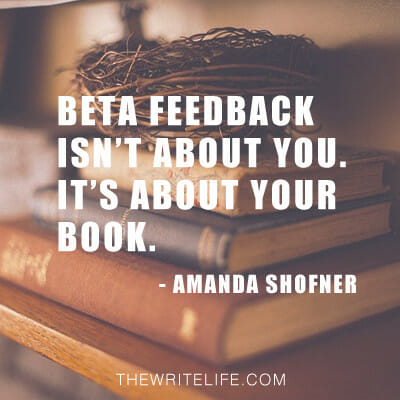
    When you feel that panic and overwhelm — and you will — stop and take a deep breath. Remember: this isn’t about you; it’s about your book. They’re not the same. Pull your ego out of the equation and focus on writing the best book possible.

    And if that means deleting 7,000 words from the end of your book and rewriting it, gird your fingers and hit the delete key. That’s what happened to me, and look: I survived.

    Image: Beta Feedback

    How do you implement beta reader feedback?

    Once you’ve beaten the inevitable freakout, you have to evaluate each piece of feedback to decide what to revise. Think critically about what your betas said and how it fits into what your book, characters or plot needs to accomplish.

    If your book is about how you started your business, for example, and your beta says, “I want to know about your childhood,” but your childhood has nothing to do with the beginning of your business, you can ignore the comment. Yes, ignore. As the author, you have the power to accept or reject feedback.

    Because I asked my betas to comment as they read, I created a new Word document with all 531 comments. New documents are important: If you decide your original wording is better, you want to be able to revert back. Tracking changes and creating new files makes this easy.

    But before I changed anything in my manuscript, I went through each comment and made one decision: keep or delete.

    Comment #1: “I like the disjointedness of the beginning.” Delete.

    Comment #5: “You’ve used ‘eyes’ three times in two sentences.” Keep.

    Comment #7: “The others didn’t notice the door?” Comment #8: “She’s been there how long, and she’s just now going through the door?” Keep. Keep.

    Comment #13: “At what point does frostbite become an issue?” Though this is a good question, only one beta pointed it out, and she’s never experienced cold weather. Delete.

    Once I’d gone through the entire document and deleted comments, the remaining ones became my new “needs-to-be-fixed” list. These items can range from tasks like copyediting (comment #5) to adding information (comments #7 and #8) to rewriting entire chapters (the last 7,000 words).

    Don’t take feedback at face value — dig deeper. Notice how two comments expressed disbelief at the door. That’s a red flag. But it’s not just about answering their questions — it’s about understanding the missing story elements.

    From their comments, I knew I had to flesh out the setting (why the door is hard to notice) and how the setting affects my characters (why one girl would wait to go through the door and why the others didn’t notice it). Confusion means you’re missing something, and it’s up to you to figure out what it is and how to fix it.

    When you implement feedback, get in touch with your author gut. Your instincts will tell you what needs to be fixed and what’s fine as is. Listen to it. Not sure what a beta meant by a particular comment? Don’t be afraid to follow up with them to ask for clarification.

    Once you’ve incorporated your beta feedback, you’re one step closer to hitting “Publish.” Congratulations — and best of luck with the final stages of the process!

    Don’t forget to thank your beta readers

    Finally, remember to thank your beta readers. Unless you paid them, your betas volunteered their time and effort to help you produce a better, stronger manuscript, so make sure to show your appreciation. 

    I’ve found that all the beta readers I’ve worked with have been more than happy to simply receive a book for free, even if that means they have to leave feedback on it. Most are surprised and excited when I tell them they’ll also be receiving a print copy of the book when it’s finalized.

    You don’t have to send out print books, but do make sure your beta readers feel appreciated for the time they put into helping you. If your betas are writers as well, you could even offer to be a beta for their future writing projects.

    Have you worked with beta readers — or been one?

    This is an updated version of a story that was previously published. We update our posts as often as possible to ensure they’re useful for our readers.

    Photo via Impact Photography / Shutterstock 

  • Yes, Freelance Writers: Earning Six-Figures *Is* a Realistic Goal

    Yes, Freelance Writers: Earning Six-Figures *Is* a Realistic Goal

    When it comes to freelance writing, there is a lot of well-meaning advice out there. And for the most part, that’s a good thing. 

    Assuming you have an internet connection and a laptop, you have all the resources you need at your fingertips. You can learn how to pick a niche, get clients and set up your freelance writing website from the comfort of your own home. 

    But a lot of the conversation that happens around freelancing is unhelpful.

    For instance, I’ve noticed there’s this tendency for many freelancers to brush aside the topic of money and act like it doesn’t matter. 

    As a freelance writer, you should care about more than just doing work you enjoy for clients you like. I think you should care about making more money. Yep, I said it. 

    In fact, if you’re serious about giving freelance writing a go, then I think your goal should be to learn at least $100,000 per year. Here are a few reasons I believe that’s true. 

    1. More income = more impact

    The other day, I saw a website that said “impact over income.” That sounds like such a lovely idea, doesn’t it?

    Imagine being someone who cares more about the people they’re helping than how much money they’re making. The world would be a better place if more people adopted that attitude.

    Of course, the world would also be a better place if we could all get our basic needs met without ever having to worry about money. But since that’s not going to happen, we all need a way to bring in money. 

    My experience is that I have the ability to make more of an impact when I make more money. That’s because my needs are met, and I have a whole lot more brainpower to devote to other people who I’m not worried about getting my bills paid. 

    If you’re someone who regularly says this then please stop. It’s a false choice — you create more impact and more income. 

    2. Money gives you more time

    Ever since I started freelancing in 2016, I wanted to earn six-figures. But for a long time, I struggled with this idea because I thought earning more money would make me a bad parent.

    I thought that if I earned six figures as a freelancer, I would work constantly, ignore my kids and miss out on their childhood. 

    Yikes! Who wants to focus on making more money with that kind of mindset?

    I bring that up because I think it’s a common limiting belief people have around money. Many people think if they earn more money, they’ll work constantly and lose all sense of work-life balance.

    And in fairness, that does happen for some people, but it doesn’t have to. I worked much harder and longer hours as a $40,000 a year freelancer than I do as a freelancer who makes over $100,000 a year.

    Why? Because I have the money to outsource the tasks I don’t like to other people. I can hire other people to clean my house, design my website and schedule my social media posts for me, among other things.

    I also have the ability to turn down clients who aren’t a good fit and charge more for my services. And I’ve been able to branch out into offering digital products to earn more passive income. 

    3. It’s a totally doable goal

    If you’re like me, then you probably follow many freelance writers you admire on Instagram, LinkedIn and Twitter. And have you ever noticed they occasionally try to taper down your expectations? 

    They might say something like this, “Success doesn’t happen overnight! I had to work hard for years before I started earning six-figures. I wrote boring articles, worked with crappy clients and worked day and night to get to where I am!”

    I get why people say things like this. They’re trying to paint a realistic picture of what it looks like to make a living as a freelance writer. And likely, trying to weed out all the people who aren’t serious and only want to make a go of freelancing if it comes easily. 

    Here’s the thing — people who aren’t serious and don’t want to put in the work are going to quit regardless. There’s nothing you can say or do to help them “see the light.”

    But what I’ve found over and over again is that most serious freelancers massively sell themselves short. They scrape by financially every month and don’t think earning more money is possible for them.

    So if you take only one point from this blog post to heart, let it be this: earning six-figures as a freelance writer is a completely realistic and doable goal.

    Stop making it seem like this huge, overwhelming task that only a few rare freelance writers can accomplish! I promise you that it’s not.

    I’m not saying that it’ll be easy or that there won’t be setbacks along the way. Of course, it will take work, but you already know that. 

    But it’s also not as hard or as elusive as you think it is. So do yourself a favor and believe that it’s possible.

    Photo by Brooke Cagle on Unsplash

  • Trello vs. Asana: Where to Manage Your Freelance Writing Projects (For Free!)

    Trello vs. Asana: Where to Manage Your Freelance Writing Projects (For Free!)

    As a freelance writer, a reliable (and affordable) task management tool is a game-changer, and Trello and Asana are two of the most popular options out there.

    It’s easy to see why: They both offer robust free products.

    But which one is better?

    If you’re struggling to make the call, this guide breaks down the details of each platform and their strengths and weaknesses so you can determine which one is best for you and your freelance business.

    Trello vs. Asana: The basics

    We’ve established Trello and Asana are both well-known, solid project management tools, but let’s dig into the details.

    What is Trello?

    Trello is an online tool that organizes your projects and tasks into Kanban-style boards. 

    Kanban is a workflow framework that helps you visualize your tasks. In Trello, you can set up individual boards, and within those boards, you can create tasks, which you can then move to different lists.

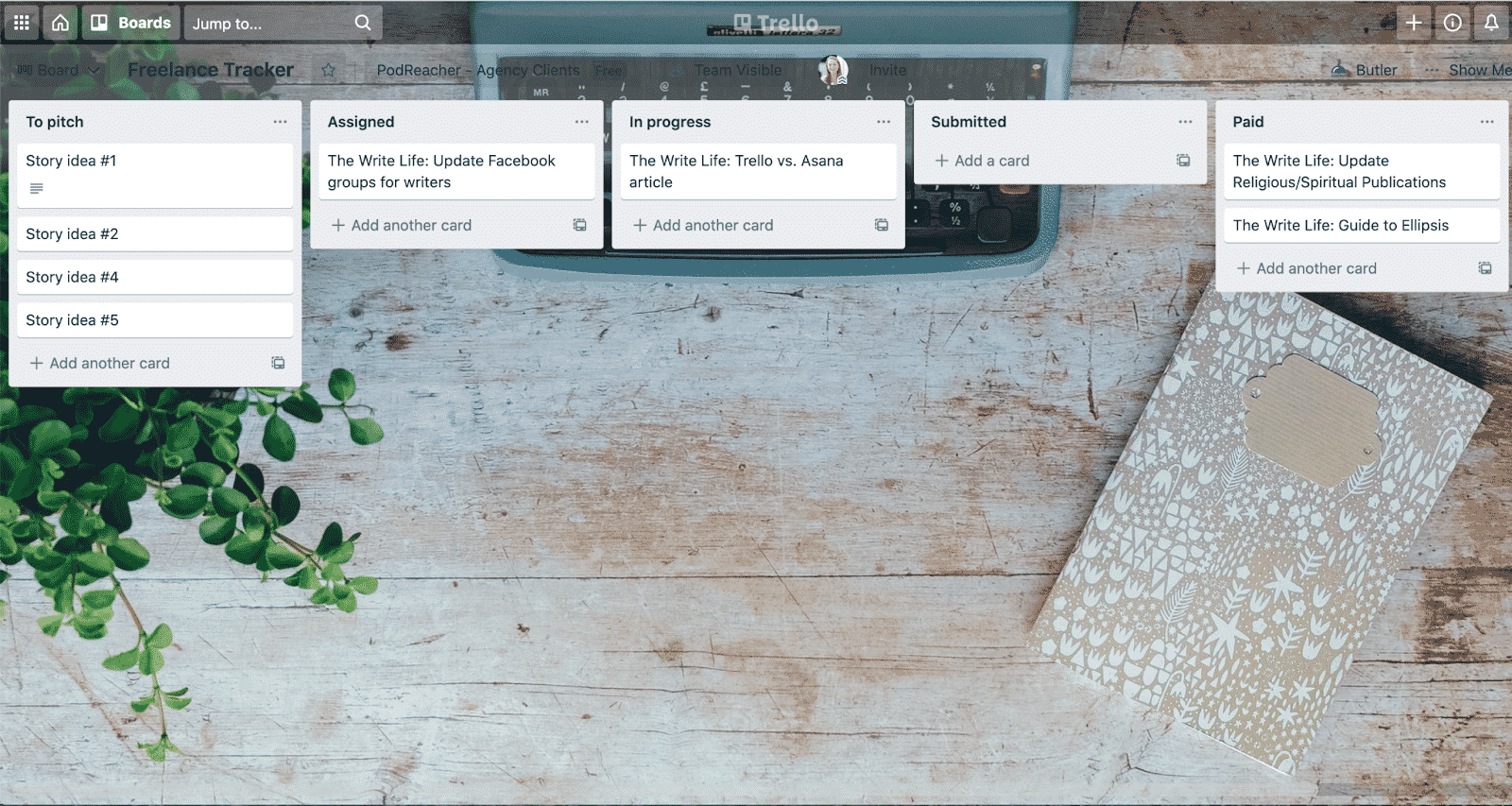
    Take a look at an example of a Trello board:

    I’ve set up several lists within my example “Freelance Tracker” board: To pitch, Assigned, In progress, Submitted and Paid.

    Under each list, I’ve added task cards, which I can easily click and drag from board to board. For instance (and not to get too meta here), this article I’m currently drafting would have started on the “To pitch” board. Right now, it’d be sitting “In progress” as I draft the article.

    You can add more details to each task card, including a due date, checklist (like subtasks) or attached files.

    What is Asana?

    Asana is another go-to project management tool that can help you organize and track your freelance assignments.

    Asana works similarly to Trello in that you can set up different projects and, within those projects, create tasks, which you can then move from section to section.

    Take a look at an example:

    Again, you can see I set up my example “Freelance Tracker” project (this could also be the name of a specific client if you’d prefer to organize your tasks more granularly by client). Then I’ve set up sections and, within those sections, are my tasks.

    Like Trello, you can add information to these tasks, including assignees, due dates, task descriptions and subtasks.

    Trello vs. Asana: Pros and cons for freelancers

    So far, you can see these two tools have quite a few similarities, but let’s get into the details and break down the pros and cons when it comes to managing freelance work.

    Trello pros and cons

    In a world where there are so many apps, tools, websites and “solutions,” the ease of Trello is a huge win. You’ll spend little time wondering, “How do I do that?” or “Where’s that darn button?!” Moving tasks around within sections is as easy (and satisfying) as dragging and dropping them.

    With Trello, there’s also a lot of flexibility when it comes to setting up a workflow. You can set up one singular “Freelance” board, like the example above, and track assignments and projects there, or you could easily create boards for each client.

    There are many other ways you can get creative and make Trello fit your needs. For instance, freelance writer Adryan Corcione shared how they use Trello to track pitch ideas and target publications.

    And if you don’t want to start a board from scratch, Trello has templates. Oh, and don’t forget to customize the board’s background. That’s the best part!

    If you’re on the go, the Trello app makes it super easy to check in on tasks or add cards — we all know story ideas hit at the most random times. You can also set up notifications so Trello gives you a nudge when an assignment is 24 hours out from a deadline. (Note: Asana has an app, too, but I found it a little less intuitive.)

    Trello also has something called Power-Ups, which allows you to add various integrations to your boards. For instance, you can sync your Google Mail account and create tasks directly from emails. Or, if you bill some of your clients by the hour, you can add time-tracking integrations.

    These can be useful, but feel a bit complicated initially. You can also only use one Power-Up per board if you’re using the free version of Trello, so you’ll have to pick what’s most important to you.

    Another downside? Trello’s bread and butter is the Kanban-style boards, so you can’t see your assignments in one comprehensive to-do list or calendar view unless you want to pay to upgrade.

    Asana pros and cons

    Whereas Trello is simple and straightforward, Asana is a bit more sophisticated and may require more patience until you find your stride.

    The perk of Asana for freelance writers is clear: You can view your assignments and projects in various formats. It offers Kanban-style boards like Trello, but you can also view your projects as a list (see above for example) or in calendar view — for free.

    You can also see all your tasks, no matter which project they’re housed in, and Asana will sort them by Today, Upcoming and Later based on due dates.

    If you want to “level up” your Asana skills, you can add 100-plus app integrations to your boards — also for free. And Asana has even made its own app integrations for tools like Slack, Google Calendar, Google Drive and Harvest time tracking, so you can be sure the process is smooth — and secure.

    Asana’s free product is also built for team collaboration. You can easily add subtasks and assign them out.

    For instance, if you’re working with a graphic designer or photographer on a story, create a subtask, set its due date and assign it by name or email. (Note: Trello is also a great tool for team collaboration, but if you want to get this specific with subtasks, you’ll need to upgrade to the Business Class plan.)

    The biggest downside to Asana is it’s a bit overwhelming at first. Be patient as you navigate the platform for the first time. You’ll likely find you don’t need a lot of the features unless you’re working on a team or a multi-faceted project.

    Trello pricing vs. Asana pricing

    As mentioned, both Trello and Asana offer free versions of their tools, and these free versions should give you access to everything you need as a freelancer.

    Under Trello’s free version, features include:

    • Unlimited cards
    • Unlimited members
    • Up to 10 boards
    • Unlimited storage
    • Unlimited activity log
    • Assignee and due date
    • iOS and Android mobile apps

    If you want additional board views, including timeline, dashboard, team table and calendar, you’ll need to upgrade to the business class plan, which starts at $10 a month. This plan also offers unlimited boards, unlimited Power-Ups, advanced checklists and more.

    Under Asana’s free version, features include:

    • Unlimited tasks
    • Unlimited projects
    • Unlimited messages
    • Unlimited activity log
    • Unlimited file storage
    • Collaborate with up to 15 team members
    • 100+ app integrations
    • iOS and Android mobile apps

    You’ll need to upgrade to the premium version of Asana (starting at $10.99 a month) if you want to tap into additional project management tools like start dates, task dependencies, milestones and custom templates. You’ll also get access to advanced reporting tools, unlimited free guests and more.

    Which one is better?

    Both Trello and Asana can drastically transform the way you manage your freelance business. By using one of these platforms, you likely feel much more in control of your work and be able to more easily stay on top of your deadlines and payments.

    Ultimately, Trello is going to be your most simple choice. It’s easy to use and takes no time to get the hang of. Asana, on the other hand, may require some patience, but the free version does offer more capabilities.

    At the end of the day, you can’t go wrong with either.

    Photo by Unsplash on Unsplash

  • Using Images in Blog Posts: 9 Tips for Bloggers and Freelance Writers

    Using Images in Blog Posts: 9 Tips for Bloggers and Freelance Writers

    You’re a writer and your words are important — but are they enough?

    Online, it’s tough to keep readers’ interest. They have lots of distractions at their fingertips, plus reading on their device is tiring. An attention-grabbing image can draw them in.

    If you’re writing for your own blog, finding, modifying and using images appropriately is completely up to you.

    If you’re a freelance writer producing blog content for your clients, then they may want you to suggest images. Some clients will even ask you to upload your completed post, including images, into WordPress for them.

    Best practices for using images in your blog posts

    Here are nine best practices for using images in your blog posts, whether for your blog or for your clients’ blog.

    1. Always make sure you can legally use an image

    When you’re looking for images, it’s very tempting to go straight to Google’s image search, type in what you want and pick an option.

    Don’t do this. The images you find are very likely protected by copyright. Using them can land you — or your client — with a whole range of problems. At best, you might get a polite email asking you to remove the image. At worst, you might end up facing a hefty fine: in a few cases, images have been deliberately used to lure unwitting victims

    The best places to find images that you can legally use on your blog, or a client’s blog, are:

    2. Come up with several different image options

    When you’re searching for an image to use in a blog post, it’s tempting to simply pick the first one that you think will complement your work well.

    Sometimes, looking a little longer can give you a much better range of images to choose from. Plus, if you’re using popular stock photography sites, digging a bit deeper than the first handful of images is likely to give you something more unique.

    If you’re finding images for a client to approve, they may well appreciate you suggesting several options to choose from.

    3. Use images that represent your audience and brand

    Some stock photos can seem a little “cheesy” or overused and it’s important to keep searching to find an image that’s a good fit for your audience and personal brand.

    For instance, perhaps you’ve written a blog post about how setbacks can help you grow and go further. You could illustrate this with a photo of a seedling growing… but that might not resonate with your audience of sporty college students. Maybe a picture of a race track would work better instead.

    You may also want to keep in mind the color palette of your blog (or your clients’ blog) when you’re choosing images. Perhaps you want to use images with lots of bright primary colors, or maybe soft, pastel shades would suit your site better.

    4. Crop and edit images to suit your piece

    Sometimes, you might find a great image that needs a few adjustments to work. If the image is landscape and you need it to be portrait, you might be able to crop it at the top and bottom to make it work. If the image is too dark or light, you could adjust the brightness and contrast.

    You don’t need to have expensive graphics editing software to perform basic image editing tasks. Free tools like Paint.NET can work just fine for simple edits. 

    Note: Depending on where you sourced your image, you might be able to use it freely but not edit or modify it in any way. Check the site’s terms and conditions if you’re unsure.

    5. Resize images to the correct width for your blog

    Whether you’re adding images to posts for your own blog or posts for a client’s blog, you want those images to be the right width before you upload them. Otherwise, they’ll need to be resized by the blogging software, potentially making them look fuzzy or take longer to load.

    It’s a good practice to have a standard width for all images on your blog. This should be no more than the width of the post content area. For many blogs, somewhere from 500px-800px works well.

    If you have a lot of images to resize, you can do them all at once using an online tool such as Bulk Resize Photos.

    6. Compress images before uploading them

    Each image in your blog post takes time to load. If you have several images that have a large file size, your website will be noticeably slower.

    Readers will be impatient with slow websites and may leave before your content loads up on their device. Plus, search engines like Google are increasingly favoring fast websites, ranking them more highly in search results.

    This is why it’s so important to compress your images before uploading them. Your image will stay the same size and should look the same after compression, but its file size will be smaller.

    The easiest way to compress images is to use online tools like TinyPNG and Compress JPEG.

    Tip: Use the .jpg format for photos. Use .png for images with only a few colors, text or a transparent background: this includes most screenshots and logos.

    7. Name your image files using keywords

    Let’s say you’re writing a blog post about libraries and their importance in local communities, titled “Why Libraries Matter And How You Can Protect Your Local Library.” 

    When you download a typical image, it might be named something like this:

    books-1617327_640.jpg

    That file name doesn’t include much useful information. Before uploading the image to your blog, you should rename it using useful keywords:

    why-libraries-matter.jpg

    Search engines can read image file names, so using keywords here can give your SEO (search engine optimization) a slight boost. 

    8. Add alt text for your images

    All images on your website should ideally have alt text (“alternative text”). This can be read by search engines, but more importantly, it can be read by screen readers. These are used by people who are blind or partially sighted.

    Alt text makes your post more accessible, particularly if the images are important to the meaning and you write good, descriptive alt text.

    For instance, here’s an image of library books from Pixabay:

    Using the alt text “books” wouldn’t be very helpful. Instead, something like “Library books displayed on shelves” would work better.

    Note: Alt text isn’t the same as title text. The title text for an image will be displayed when the user runs their cursor over the image. The alt text won’t be seen by regular users, only by search engines and users with a screen reader. It usually makes sense to use the same phrase or sentence for both the alt text and the title text. For help adding these, check out this post on image alt text vs image title.

    9. Consider using arrows or other elements on screenshots

    If you’re demonstrating a technique using screenshots, it’s helpful to add arrows or boxes to point out particular parts of the image. These are sometimes called “callouts” or “markup.” 

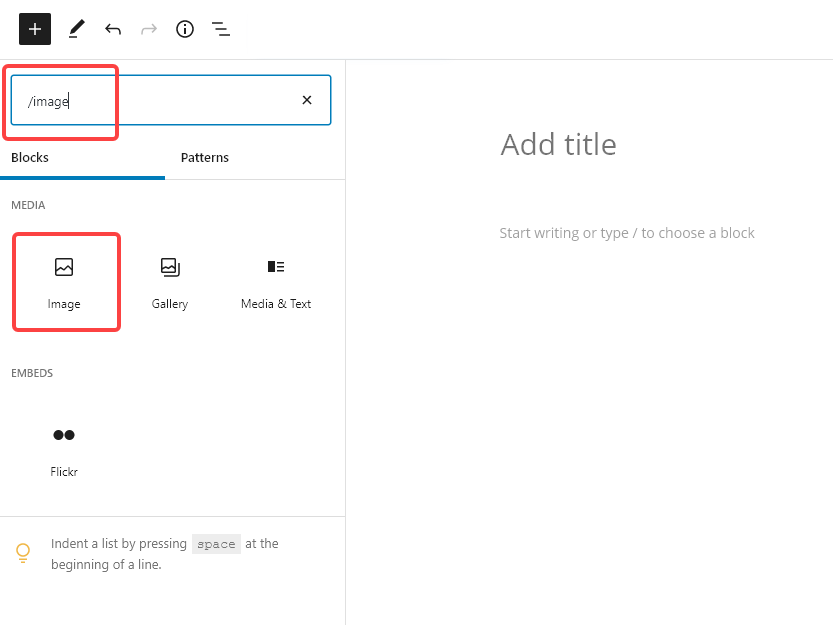
    For instance, here’s a screenshot that shows you how to add an ‘Image’ block in WordPress’s block editor. The red boxes show you where to type in the search box and what to click on:

    If you’ve got a screenshot with multiple different elements, using arrows or boxes can help readers quickly take in the relevant parts.

    You may well feel, as a writer, that words are your thing. But using images in your content isn’t hard — and the right images could make a real difference to how engaging and useful your posts are.

    Photo by cottonbro from Pexels

  • 6 Creative Ways to Name Your Fictional Characters

    6 Creative Ways to Name Your Fictional Characters

    When you start writing your story, how long does it take you to come up with character names?

    Choosing the perfect name for your protagonist and antagonist can take ages, especially when you’re not sure how to start.

    I’ve been there. After wasting days staring at a blank computer screen, attempting to come up with names for all of my characters, I developed with some helpful naming strategies. And I’d like to share them with you!


    How to develop cool names for fictional characters

    Using any of these methods cuts down the amount of time I spend coming up with character names and lets me get back to the actual writing. So next time you’re stuck and can’t decide what to name your dystopian sharpshooting heroine, try one of these ideas.

    Here’s how to come up with interesting character names in your fiction.

    1. Match name with theme using a character name generator

    Are you a fan of symbolism? Write down your story’s themes and then head to a name generator website or baby name site to search for names related to those themes.

    Funnily enough, I have found that the name Andre shows up under themes like manly, strong and brave, which of course I am… in my stories, at least.

    2. Use Fido and your street

    Confused? Let me explain.

    Try your pet’s name as the fictional character’s first name, and your street’s name as your character’s last name.

    Mine would be Butch Fields, and yes, he comes from the rough part of a fictional town.

    3. Combine the names of your favorite authors

    A second helping of Stephen Rice, anyone? See what I did there?

    Maybe you don’t feel comfortable using the names of living writers, so how about this… Jack Hemingway. See, I used Jack London and… you get it. Apply it to your work!

    4. Use a name translator

    Yep, there is such a thing. A name translator allows a writer to easily discover names in other languages.

    To use this, however, you have to have a name in mind. Give it a whirl by putting your own name into the translator.

    Head to your favorite search engine and search for ‘name translators’ or ‘my name in’ and type in any language, such as Chinese or Hebrew. You’ll find plenty of free name translators to play with.

    5. Use an encyclopedia and your creative side

    No matter what genre it is, think about where your story takes place. Your setting can inspire names for your characters.

    Does your story include mountains? Are they part of your fictional characters’ culture? Then research people who have mountains as a part of their culture, such as the Andean people of Peru and the Appalachian people of North America.

    What if your story takes place on a faraway planet? Your setting likely looks a bit like some place you’ve seen before on Earth, or maybe a mix of several places.

    Think of those real places that inspire your off-world setting, and then think of the real people that make those places their home. Research those places to get a feel of what your fictional culture could be.

    After completing your research on the culture or cultures that inspired your fictional one, use the names in those real cultures for inspiration for the names of your fictional characters.

    6. “Borrow” from a friend or family member

    This is the easiest way to create a fictional character name because you aren’t actually creating one! All you’re doing is copying. Maybe your father is your hero, so you decide to name your protagonist after him.

    Of course, if you decide to go this route, be careful. Ask permission, and let that person know ahead of time of how they will be portrayed.

    You might think you’ll only use their name, but some of their personality traits may unwittingly end up in your story as well. Especially if you are the type of writer that skips outlines and lets the story unfold in front of you as you write it.

    Now get out there and come up with some character names that are perfect for your story.

    This is an updated version of a story that was previously published. We update our posts as often as possible to ensure they’re useful for our readers.

    Photo via GaudiLab/ Shutterstock 

  • 23 Facebook Groups for Writers You Don’t Want to Miss

    23 Facebook Groups for Writers You Don’t Want to Miss

    Whether you’re a freelancer, a blogger, a fiction writer or anything in between, we could all use a little company on the sometimes lonely road known as the writing life.

    Maybe you just got your first offer to ghostwrite a book and have no idea what to charge. Maybe your characters refuse to do what you want them to do (isn’t that just like them?), and you could use someone to commiserate with. Maybe it’s after midnight and you’re still up trying to wrestle the words into submission, and you find yourself searching for “writing groups near me” just to find a few writer friends.

    Whatever the reason, online writing groups can be a fantastic way for writers to connect, trade advice, swap war stories and find new opportunities. Knowing there are other people out there who “get” what it’s like to be a writer can be a huge comfort, and the chance to share experience and tips with people on all stages of the writing journey is invaluable.

    [sps_reusable_block post_id=43047]

    These online writing groups are supportive and helpful

    We polled writers to find out which online writing groups they personally could not live without — and many of them relied heavily on Facebook groups.

    Note: Even if a Facebook group isn’t currently super active with members posting, you can still find a ton of great resources. We suggest searching groups to find topics you’re interested in. For example, search “rate,” “pay” or “compensation” to find topics on money.

    So here are some of the best Facebook groups for writers.

    1. The Write Life Community

    Before we dig in deep about what’s out there, we hope you’ve joined The Write Life Facebook group! Writers of all experience levels share their struggles and wins, ask each other questions, and generally support and encourage one another. Recent topics of discussion include how to beat procrastination and the best ways to find remote writing opportunities.

    Size: 28,100 members (as of March 2021)

    2. Author Success Collective

    This group for aspiring and current authors was created by Self-Publishing School to allow a place for authors to come together, talk about what’s working and not, along with a place to connect with like-minded people with a single goal—to write and publish high-quality books that sell. They also host challenges with unique, themed-based content to help you along your journey.

    Size: 4,000 members and growing

    3. The Freelance Content Marketing Writer

    Created by Jennifer Goforth Gregory, who has a book by the same name as the group, this space is for writers who work in content marketing. Most have a background in digital marketing, journalism or freelance writing, and they discuss topics like how much to charge for specific services, where to look for a virtual assistant, and alternatives to getting paid with PayPal. Plus, each week a jobs thread is created, so you can check out new opportunities.

    Size: 6,300 members (as of March 2021)

    4. Writers Helping Writers

    Whether you’re a newbie looking for advice or an established pro who’d like to pay it forward, this community is a great place to support and learn from other writers, as well as editors, publishers, agents and more. Posts include writers asking for feedback on cover designs, sharing motivational quotes and comics about writing, and sharing writing wins.

    Size: 286,000 members (as of March 2021)

    5. What’s Your Plan B?

    This group is for journalists who have left the industry, are preparing to leave the industry, or fear they might be forced into leaving the industry… and what they’ve gone on to do with their careers. It’s full of ideas from writers and editors who have used their skills to make an income in new ways and requests from journalists who are struggling with the change. It’s a supportive space!

    Size: 16,200 members (as of March 2021)

    6. Pat’s First Kindle Book (From Start to Finish)

    Ever wanted to write a Kindle book or wondered how the process works? Join this group to get a behind-the-scenes look at popular blogger Pat Flynn’s own journey to publish a Kindle book from start to finish. In addition to watching Pat’s journey, readers have a chance to ask questions, share their own advice and experiences and get feedback on similar projects they’re working on.

    Size: 16,700 members (as of March 2021)

    7. Inner Circle Writers’ Group

    Created by Grant Hudson of independent publisher Clarendon House Publications, this group is for new and established writers who are interested in the craft and practice of writing. Many of the posts are writers cheering each other on as submissions are accepted and published, so if that’s something you’re working toward, you’ll be in good company here.

    Size: 9,000 members (as of March 2021)

    8. Ask a Book Editor

    This group is all about asking questions you have about the writing process and getting answers from editors. Admins prefer participants ask specific questions, rather than posting excerpts and asking for feedback. This is a great place to lurk and learn even if you don’t have a reason to participate! There’s also a Help Wanted section for writers looking to hire an editor.

    Size: 7,600 members (as of March 2021)

    9. 10 Minute Novelists Group

    For novelists looking to improve their craft, especially those who are crunched for time to write. As one member told us, “10-Minute Novelists is my all time favorite…the group is so supportive, the admins are very active in discussions and post regularly…It’s helped me so much!” Look for inspiring features like Tuesday #BuddyDay (when you can find critique partners and beta readers) and Wednesday #AuthorHappiness chats (where members celebrate their weekly successes).

    Size: 15,900 members (as of March 2020)

    10. Beta Readers and Critique Partners

    If you’re willing to become a beta reader or critique partner, or you want to find one for your work, this is the place to connect with other writers. You’ll see calls for reads of poetry, action, drama, historical fiction, personal essays, non-fiction…pretty much every type of writing.

    Size: 18,700 members (as of March 2021)

    11. Word Nerds Unite

    Run by Gabriela Pereira at DIY MFA, a do-it-yourself alternative to a master’s in writing, this group focuses on all things writing. Topics have included how to beat writer’s block, call-outs for beta readers and grammar questions. Pereira herself interacts regularly, sharing Word Nerd Wins and hosting weekend writing sprints, which she says are like virtual writing retreats. This is a fun and motivated crowd!

    Size: 8,400 members (as of March 2021)

    12. Calls for Submissions (Poetry, Fiction Art)

    This group collects submission calls for poetry, fiction and art and presents them all in one easy-to-follow place. If you’re looking for publication opportunities, it’s worth checking out.

    Size: 66,300 (as of March 2021)

    13. Indie Author Group

    This group of indie authors and self-publishers focuses mainly on fiction. It’s a great place to get advice, air your grievances and discover new authors.

    Size: 12,100 members (as of March 2021)

    14. Indie Writers Unite!

    Open to indie writers of all kinds, this group allows self-promotion only in admin-created threads, and has a fair but firm panel of moderators who keep spammers and trolls at bay.

    Size: 8,200 members (as of March 2021)

    15. Journey Feed Blogging Community

    Founded by blogger Edwin Covarrubias, this is a place for bloggers to connect and share ideas. You’ll also find opportunities to promote your blog if you’re a new blogger looking to find readers.

    Size: 4,900 members (as of March 2021)

    16. Blogging Boost

    Another group chock full of advice, resources and support for bloggers, this group limits self-promotion to Mondays only, which helps save your feed from over-saturation.

    Size: 33,000 members (as of March 2021)

    17. Write On! Online

    An extension of a live group that started at a Barnes & Noble in California in 2002, this group aims at helping writers set goals, troubleshoot and network. It’s hosted by hosted by Debra Eckerling of The D*E*B Method. As one member told us, “They have a supportive environment…to provide that much needed ‘kick in the pants’ without the guilt.”

    Size: 2,500 members (as of March 2021)

    18. Writers Write

    If you’re looking for less of a participatory experience and more of a compendium of all things writing, this group is a fun news source of recent doings in the writing world. Notable posts include reaction to Bob Dylan’s nomination for (and subsequent radio silence towards) the Nobel Prize for Literature and Kanye West penning a poem on McDonald’s french fries for Frank Ocean’s new art mag. Dare we say it’s a great way to kill a little “writer’s block” time?

    Size: 19,800 members (as of March 2021)

    [sps_reusable_block post_id=43047]

    19. Writers World

    As one of the phrases on this group’s logo image indicates, you need “lizard skin” to be an active member in this critique-only group. You’ll find no pep talks or ego-fluffing here, simply polite, but pull-no-punches assessments of any pieces members offer up for critique. (One of the admins has edited for Disney and NBC, if you wonder how useful those critiques are.) If you want to get serious about your work, and you can handle bold honesty, this group can help you hone your skills.

    Size: 7,600 members (as of March 2021)

    20. NanoLand

    Have you ever participated in National Novel Writing Month (aka NaNoWriMo)? This group can help you through the challenge by offering support, tips and empathy as you type, type, type your way to 50,000 words in 30 days. It continues to stay active outside of November, too. 

    Size: 22,600 members (as of March 2021)

    21. Women Writers, Women’s Books

    Ladies, this one’s for you. Connect with women writers of all genres and experience levels, from indie scribes to traditionally published and self-published authors. Member Suzanne Brazil said of the group, “They have an active Twitter presence, publish helpful essays, support each other’s blogs and author pages and are generally just a great place for technical questions, writing advice, and encouragement! Can’t recommend them highly enough.”

    Size: 19,200 members (as of March 2021)

    22. The Aspiring Travel Writer

    Run by blogger and podcaster Alexa Williams Meisler of Break Into Travel Writing, this group’s goal is to provide “a page to ask questions, share ideas and support each other in the travel blogging world.” Self-promotion is limited to “Friday Free for Alls” to allow members to focus more on supporting and learning from each other.

    Size: 8,300 members (as of March 2021)

    23. Writing Bad

    Whether you’re just starting out or you’re a seasoned author with several published titles to your name, this group welcomes you. The whole concept is they don’t believe in bad writing — just undeveloped writing that needs some TLC. The members of the group are there to offer you support.

    Size: 13,700 members (as of March 2021)

    Want more Facebook groups for writers to choose from? Writer Elna Cain offers more ideas here.

    This is an updated version of a story that was previously published. We update our posts as often as possible to ensure they’re useful for our readers.

    Photo via sitthiphong/ Shutterstock 

    [sps_reusable_block post_id=43047]