Tag: productivity

  • What’s on Your Wish List for The Writer’s Bundle 2016?

    What’s on Your Wish List for The Writer’s Bundle 2016?

    For the past two years, we’ve offered The Writer’s Bundle, an amazing package of writing resources for a limited-time low price.

    It’s been a great opportunity not only for us to share top-notch courses, guides and expert knowledge; but also for you to make a major investment in your writing and business skills for a considerable bargain.

    As we enter the new year, the TWL team is kicking around ideas for partnering with experts and creating more content to help you succeed as a writer.

    But as we complete our own brainstorming exercises, we’d love to know:

    • Which resources would you love to see in a 2016 version of The Writer’s Bundle? Which guides, courses, or programs are on your professional-development wish list?(Check out The Writer’s Bundle 2015 and 2014 to see what we’ve included in the past.)
    • Is there a particular skill or concept you’d like to learn about, but can’t find a resource that covers it? Let us know what you’re searching for — perhaps we can serve as a continuing education concierge in the comments.

    Share your thoughts in the comments so we can help you continue to create, connect and earn in 2016!

  • Writing a Book? How to Know When to Stop Editing and Move On

    Writing a Book? How to Know When to Stop Editing and Move On

    You’ve done it: written a novel, revised it, sought outside opinions and revised some more. Maybe your magnum opus has gone through endless drafts.

    But something’s still not right. Either it’s not shaping up into the book you hoped it would be, or it’s not getting the reception you want from agents and publishers.

    It’s tempting to keep re-working the manuscript. I spent years laboring over a historical novel set during a yellow fever epidemic in New Orleans. How many iced mochas did I down in the coffee shops where I did my writing? How many hours did I spent in library archives perusing microfilm copies of 19th-century newspapers? There’s no telling. Even with all that effort, the story never quite worked.

    Sometimes, the best thing you can do for your writing career is to shelve your project and begin anew. Here are some things to keep in mind when you’re wondering, “Should I stay or should I go?”

    Quantity trumps quality

    Fail Fast, Fail Often tells a story about a ceramics class. Half the class is graded on the quantity of work they produce, and the other half is graded on its quality. Anyone in the first group who makes fifty pounds of pots gets an A. Anyone who produces a great pot in the second group gets an A, even if she makes only one pot for the whole semester.

    Spoiler alert: The students in the quantity group make the best pots. While the quality kids are hemming and hawing over how to make the perfect pot, the quantity kids are experimenting, learning from their mistakes and getting pretty darn handy with mud.

    Writers could benefit from adopting this quantity-over-quality mentality, as well as remembering writing is a craft that benefits from repetition.

    You may be holding yourself back from your best work

    Stephen King is one of my favorite writers, and the man is prolific — he’s penned 54 books. But compare book one (published in 1982) of The Dark Tower series to book five (published in 2003). In between those volumes, he published 26 novels.

    King becomes a much stronger writer after he has written dozens of books. Where would the world be today if King had spent a decade polishing Carrie? We wouldn’t have The Stand, The Shining, Cujo, Christine… the list continues.

    It gets easier

    My debut novel, which comes out next month, is not my first, second or third manuscript. It’s actually my fourth full-length novel. And while it is better than the three that came before it, it is nowhere near as good as my fifth manuscript, which I’m plugging away at now.

    Each time, the process gets a little easier and the outcome gets a little better. I’ve learned plotting, pacing, dialogue, conflict, how to cut away the dead weight and recognize the sound of my own voice — by doing these things again and again. If I was still working on the same novel I’d started in 2004, I’d be very much like the proverbial dog returning to its vomit. (It was a really terrible draft.)

    Don’t become emotionally attached to your work

    Writers often use birth as a metaphor for the writing process. They describe their relationships with their manuscripts as a sort of dead-end romance.

    But a manuscript is not a baby. It is not a lover. While I understand why writers develop emotional attachments to something that occupies so much of their time, minds and hearts, this is not a productive way to use your energy. Give those words a beginning, middle and end, and move on.

    Starting anew is a sign of success

    A lot of writers believe if they “abandon” their manuscripts, they’re admitting failure, that they’ve wasted their time. Starting a new project isn’t failure. In fact, it’s the opposite of failure.

    Every sentence you write is a success. Every sentence you write lives inside you forever and makes each subsequent sentence better. No sentence you write is ever wasted.

    Have you ever struggled with whether you should let go of a project or give it one more revision? How did you make your decision?

  • Learn How to Use Scrivener: Free Webinar With Joseph Michael

    Learn How to Use Scrivener: Free Webinar With Joseph Michael

    Ever considered using Scrivener to organize your writing? Or maybe you’ve tried the tool, but want to learn to better use all its bells and whistles?

    We’re here to help! We’ve asked Joseph Michael, also known as the Scrivener Coach, to teach The Write Life community how to use Scrivener to get the most out of every writing session.

    He agreed to partner with us on a webinar called, How to Use Scrivener to Effortlessly Write, Organize & Export Your Book Into Various Formats for Printing, Editing, Publishing & More.

    Yes, you can really do all of that and more with this writing tool! And Joseph is going to show us how.

    How to sign up for our free Scrivener webinar

    When: 8 p.m. EDT on Thursday, June 18th

    Cost: Free

    How to register: Click here

    There’s only one catch: seats fill up quickly for this type of free training, and there are a limited number of seats available on the live chat. That means if you want in, you should sign up now!

    What you’ll learn during this webinar

    Here’s what Joseph will share with us during this free training:

    • How to set up Scrivener quickly, so you can get a lot out of the tool
    • Tips for navigating that complicated Scrivener window so you know what you need to use and when you should use it (and what to forget about so you don’t waste time)
    • The best way to customize your toolbar and turn yourself into a writing machine… whether you have a million ideas or just one.
    • How to master the Scrivener corkboard, so you can turn it into your own writing lab and never lose track of anything, forget your notes or lose your spot
    • When to use the outliner to organize massive projects, complete them, and feel completely in control of your writing process
    • How to master the art of the rewrite and save every version of your work, so you never have to worry again about losing your drafts
    • The easiest ways to print, compile, share and export your work
    • And much more!

    A bonus for attending the webinar

    This is a free training, no strings attached.

    As a thank you for attending, Joseph will offer a bonus at the end of his presentation: a 20 percent discount on his course, Learn Scrivener Fast. You’re under no obligation to buy, but the offer is there if it’s a good fit for you!

    And as an additional bonus, if you do purchase his Master or Ninja Package, we’ll also send you a free copy of The Write Life’s new ebook, 71 Ways to Make Money as a Freelance Writer, which retails for $19.

    We hope you join us for this special live event! Click here to save your spot. See you there!

  • Make a Living Writing From the Road: Tips for Working While Traveling

    Make a Living Writing From the Road: Tips for Working While Traveling

    One of the great things about figuring out how to make a living writing is you can work from anywhere.

    You can jump on a plane and then, while on a beach in Thailand or in a ski lodge in Canada, tap away at that laptop to pay for the trip.

    Well, that’s the theory anyhow. But the first time you try working while traveling, you’ll likely find it’s more difficult than anticipated.

    When I first tried to write while traveling, I realized my usual routine was broken. Hunting down morning tea was an adventure rather than a short walk to the kitchen. Hotel checkout times snuck up on me just when I was doing my best writing. And there were distractions; after all, I travel to see things and have new experiences, so it wasn’t easy to fit work into my days on the road.

    Of course, you could just take a vacation from writing and get back to work when you return home. But here’s a thought: If you can learn to write while away from home, you can afford to take trips more often.

    And yes, I did finally learn how to get some work done while traveling. So if you like to travel and want to do more of it, here are some tips for making a living writing while on the road.

    Prepare before you leave to increase productivity

    Your important files need to be available wherever you are. That’s not a problem if you use the same laptop at home and on the road. Otherwise, consider free cloud storage options like Dropbox or Google Documents, so you can access everything regardless of your location. Just remember to upload everything necessary before you leave.

    You can also install a remote access program to use your home computer that lets you log in from anywhere. LifeHacker recommends using either TeamViewer, or the built-in remote connection options available on many Macs and PCs with Windows Professional. All of these options require leaving your computer on with the remote program running, so don’t make the mistake of powering off before you head to the airport.

    I prefer to carry important files on a USB flash drive. That way I can still work where there’s no internet connection, and if my laptop crashes, I can still accomplish some work from any computer. Imagine you’re using your home desktop remotely and it shuts down on day one of a two-week trip. Of course, you could use cloud storage, remote access and a USB flash drive for total safety and convenience, but most of us don’t take that many precautions.

    What about passwords? Don’t leave home without them. Bring a paper list or email it to yourself. For security, add a certain number of digits and letters to each password but leave those off the cheat sheet, making them unusable to anyone who sees the list. Just remember the pattern you add, or you won’t be able to access anything at all!

    Bring tools that will help you write your best

    Even when using a laptop, my big clumsy fingers prefer a regular keyboard, so I take one on road trips. I use a small tape recorder for safely taking notes while driving; many of my best ideas come on long quiet stretches of highway.

    You’ll have to decide which tools are most important for you, but here are some possibilities to consider for your list (and you should have a list, so nothing is forgotten):

    • Laptop
    • USB flash drive
    • Keyboard
    • Mouse and mousepad
    • Extra battery for mouse
    • Camera
    • Pen and paper
    • Tape recorder
    • Headphones
    • USB plugin for wireless mouse and keyboard

    Check your internet connection before you move in

    One night in a hotel, my wife and I had already used the pool and watched a movie when we discovered the wireless signal in our room was worthless. Management moved us despite the room already being well-used, but it was a hassle.

    Lesson learned: Always check the connection before you settle into your room.

    Let your surroundings inspire your work

    You will be distracted from writing when you travel, but you can also be inspired. Once, sitting with my laptop in a rented cabin in the mountains of Colorado, it occurred to me how wonderful it was that I could work from anywhere, so I wrote about that for one of my websites. On another occasion, after a catamaran cruise on Lake Tahoe, I wrote about the experience and sold the article. And many writers find simply changing their setting and routine makes them more reflective and in a position to produce their best personal essays.

    You don’t have to cover travel topics just because you’re traveling. Inspiration can come for just about any niche you work in. If you write about small businesses, check out the ones around you. If you write for a landscaping magazine investigate how yards are commonly landscaped in the cities or countries you visit. Keep an open mind get inspired.

    Develop your own unique travel routine

    Routines keep you focused and prevent deadly procrastination. But since you probably can’t replicate your home pattern, you may need to develop a routine just for traveling.

    I find it easiest to write as soon as I get up in the morning, and maybe for an hour just after I check into a hotel (by that time the pool or bar is calling my name). I also find I can work well at the airport if I arrive a couple hours early, especially if I’ve brought an internet hotspot with me.

    But I have a confession: I can’t write half as much while traveling as I do at home. Instead, I do other things to be productive. For example, long road trips and a micro-cassette recorder help me come home with a ton of new ideas I can execute once I’m back at home. And although it’s tough to write articles in hotel rooms and fast food restaurant booths, when in these places I find it easy to do research and take notes for future articles.

    Of course, what works for me may not work for you. Perhaps you have to stay several days in each place to get some writing done and truly enjoy the trip. Maybe you should go to a coffee shop wherever you are, if that’s how you normally work.

    Write outside, write inside — who knows until you try. To find a routine that works for you, just hit the road and start experimenting.

    Do you try to write when traveling, and if so, what routines work best for you?

  • Track Your Pitches: Use This Spreadsheet to Land More Online Writing Jobs

    Track Your Pitches: Use This Spreadsheet to Land More Online Writing Jobs

    Successful freelance writers are organized and efficient. They don’t waste time looking up which pitches they’ve sent and which still need to be polished to go out. They don’t have to look up an editor’s name and contact information every time they want to re-pitch a publication.

    This system isn’t an accident; they use tools to track their pitches, ideas and contacts — tools that help them land better freelance writing jobs and make more money. For many of them, the tool of choice is a spreadsheet.

    This spreadsheet is different than one you might use to track your daily word count or work toward other writing goals, but you can use these tools in tandem to boost your productivity as a writer.

    Want to create your own spreadsheet to track your writing pitches, acceptances and contacts? Here’s how to make this system work for you.

    How to create a spreadsheet to track your pitches

    Whether you track your work using Excel or Google Spreadsheets, the process is the same. Alyssa Martino, an MFA student at the University of New Hampshire whose work has appeared in several travel publications and Narrative.ly, uses a spreadsheet that includes both pitches and finished pieces that she’s submitted.

    You’ll want columns for Title, Date, Publication and Result, and Martino also recommends including columns for the editor’s name and email address. “It’s a good reminder to seek out a particular editor to pitch, rather than just a general address,” she points out. This strategy also makes it easier to follow up with the editor if you haven’t heard back after a few weeks.

    Make your spreadsheet work for you

    Successful writers have learned how to tweak their spreadsheets to make them more useful and efficient, and to better support their work.

    Martino uses color coding to show pieces that have been accepted, rejected, and are waiting for a response. “If you’re submitting multiple pieces to multiple publications, it’s easy to forget and mistakenly submit twice or miss a crucial follow-up,” she explains. Editors are busy people, and you want to present yourself and your work professionally.

    Color-coding is not only a helpful reminder about which pieces need a follow-up — it’s also a fun way to keep you motivated to submit work, check in with editors and celebrate your success. As Alyssa says, “it’s secretly exciting to highlight a new due date or acceptance in a bright, bold color.”

    If you do multiple types of writing — for example, short fiction as well as nonfiction blog posts — you may want to track them on separate tabs of your spreadsheet. Or you may find it easier to look at all your writing accomplishments in one place. The point is, do what works best for your writing practice, business and goals.

    Tracking freelance writing pitches
    Alyssa Martino’s tracking spreadsheet

    Pitch better, faster

    Use your spreadsheet as a motivational tool. Craig Robert Brown, a contributor to The Sound and a humor/fiction writer, says that his spreadsheet helped him get over a fear of submitting. “I grew addicted to filling in the cells with information about my work being sent out into the world,” he writes.

    His spreadsheet also helped Brown to resubmit his work when it was rejected. “Yes, I got rejected a lot,” he says, “and I think those [rejections] in addition to my desire to fill that spreadsheet really motivated [me] to get over myself” and keep sending out work to new journals and magazines.

    Martino tracks rejections in her spreadsheet as well, and always follows up with editors. “When I receive a rejection, I often reach out to the editor afterwards, asking, ‘Is there anything I can do to make your reconsider? A different angle or focus?’ I try to make it clear that I’m willing to make revisions to fit the style and needs of the publication,” she explains.

    In the best case, that No turns into a Yes with a few tweaks to the original piece. Even if she doesn’t get a yes, Martino often receives valuable feedback that can help her make the pitch more attractive to other editors.

    Whether she hears feedback or not, Martino uses her spreadsheet to reframe those rejected pitches for new publications, similar to C. Hope Clark’s recommended “keep 13 pitches in play” strategy.

    Make using your pitch spreadsheet a habit

    For a spreadsheet to be effective, both writers agree that you need to update it frequently. As soon as a rejection comes in, record it; don’t archive or delete the email until you put it into your spreadsheet.

    Use a column for “Notes” to write down any responses you get from editors, and use this feedback to improve your next pitch. As soon as you send out a new pitch, record all the relevant details and highlight it in your chosen “waiting for response” color.

    Alyssa recommends starting a new spreadsheet every few weeks or months, so that you don’t have to continuously scroll through all of your pitches to get to the most current ones. You might also try recording new pitches at the top of the spreadsheet, instead of at the bottom, or you might enjoy seeing all of your work in one place. Experiment to find what works best for you.

    When your spreadsheet becomes a habit, it becomes something more: affirmation that you are progressing towards your writing goals. A spreadsheet is proof positive that you are a working writer. As Craig puts it, “it shows I’m taking this seriously, that I’m putting in this effort outside of the writing and editing.”

    Want a free pitch spreadsheet template to get you started?

    If you don’t already have a system of your own, or you hate the idea of making your own spreadsheet, download my spreadsheet to try for yourself. I’ve polished it up with bright colors and easy instructions, so that even the most spreadsheet-averse among you will be unable to resist.

    Try it for three weeks and see if you get addicted to filling in those cells. Pretty soon, you’ll feel motivated to submit your work regularly, follow up on unanswered pitches and watch your acceptance and publications stack up. Happy writing!

    Do you track your writing pitches and submissions with a spreadsheet? Or do you prefer a different system?

  • Your Last Chance: The Writer’s Bundle Disappears Tonight

    Your Last Chance: The Writer’s Bundle Disappears Tonight

    Wow — We’ve been blown away by all the excitement around The Writer’s Bundle. It’s great to see so many of you taking advantage of this deal, and talking about it on Facebook and Twitter!

    Still on the fence? If you want to get your hands on this fabulous package of nine ebooks and courses, you’ll need to act quickly: The Writer’s Bundle disappears at 11:59 p.m. ET tonight.

    That’s right: This is your LAST CHANCE. Don’t say we didn’t warn you!

    These resources will help you write and self-publish a book, build a freelance writing business and supercharge your marketing efforts. If you bought them all separately, they’d cost nearly $1,100 — but you can get your hands on them today for $99 ONLY.

    Click here to get The Writer’s Bundle

    Questions? Check our FAQ. If your question isn’t answered there, feel free to get in touch at team@thewritelife.com.

    And if you’ve already downloaded The Writer’s Bundle, we can’t wait to hear what you learn through these resources!

  • An Unbelievable Offer for Writers: The Writer’s Bundle

    An Unbelievable Offer for Writers: The Writer’s Bundle

    Remember that amazing bundle sale we ran last year?

    Guess what… It’s BACK! And completely different from last year. We’ve packed it full of nine new resources that will help you make a living as a writer.

    Click here for more details on The Writer’s Bundle

    If you’ve been thinking about investing in a course or ebook to help you build your freelance business or self-publish your book, now’s your chance.

    We’ve bundled together nine ebooks and courses for writers into one impressive package. If you bought each of these tools separately, it would cost you nearly $1,100.

    But through The Writer’s Bundle, you can get them for only $99.

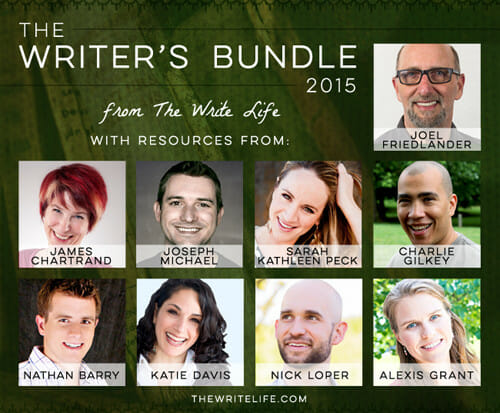
    Curious about making the most of Scrivener to write and format your book? Learn from the Scrivener Coach himself, Joseph Michael, in Learn Scrivener Fast.

    Want to give your ebook the best chance of success? Check out the step-by-step guidelines in Nick Loper’s Kindle Launch Plan.

    Querying agents and editors? You’ll definitely want Joel Friedlander’s Book Proposal and Manuscript Templates.

    The catch? The Writer’s Bundle 2015 is available for three days only.

    After 11:59 p.m. ET on Wednesday, March 11, 2015, it will be gone forever — so if you want to get your hands on this deal, you’d better act quickly!

    Click here for more details

    Resources for writers: The Writer's Bundle

    Here’s what’s in The Writer’s Bundle:

    • Kindle Launch Plan: $1,400 in 30 Days & an Amazon Bestseller, from Nick Loper (Course; retails for $99)
    • Content Strategy for Thought Leaders, from Sarah Peck (Course; retails for $300)
    • Book Proposal & Manuscript Template, from Joel Friedlander (Tools and ebook; retails for $27)
    • Learn Scrivener Fast, from Joseph Michael (Course; retails for $197)
    • Video Idiot Boot Camp, from Katie Davis (Course; retails for $297)
    • The Momentum Kickstarter Kit, from Charlie Gilkey (Tools and ebooks; retails for $47)
    • Authority, from Nathan Barry (Ebook; retails for $39)
    • Write for the Web, from James Chartrand (Ebook; retails for $23)
    • Turn Your Side Hustle Into a Full-Time Business, from Alexis Grant (Ebook; retails for $47)

    Interested? Grab your bundle before it’s too late!

  • How to Use the Pomodoro Technique as a Freelance Writer

    How to Use the Pomodoro Technique as a Freelance Writer

    Have you ever reached the end of your workday, only to feel you didn’t have much to show for it?

    Or do you sometimes find you have a hard time staying focused on your work? Does it seem like you work a lot, but you’re often spinning your wheels, instead of completing your most important tasks?

    I’ve felt the same way. Since I recently took my freelance writing business full-time, I’ve had to figure out a better way to manage my work hours.

    One strategy that’s made a huge difference in my workflow is the Pomodoro Technique. Breaking my work into manageable chunks using this method helps me accomplish more in a day than I thought possible, while keeping me focused and preventing burnout.

    Here’s how I use the Pomodoro Technique to improve my writing productivity — and how you can, too.

    What is the Pomodoro Technique?

    This time-management method was developed by Francesco Cirillo in the late 1980s.

    The idea behind the technique is people can only stay hyper-focused on a task or subject for a finite period of time — generally about 90 minutes. Instead of trying to sit at your desk from 9 to 5 (or whatever hours you currently keep), it makes more sense to break up your day into sections. The technique calls these chunks of time “pomodori,” and each one is known as a “pomodoro.”

    Each pomodoro includes 25 minutes of focused time, followed by a five-minute break. Most sources suggest linking three or four pomodori together (with those five-minute breaks in between sessions), and then taking a longer break of 20 to 30 minutes. Lather, rinse and repeat.

    Set your timer using your phone, a stopwatch or a regular clock, or download one of several dedicated Pomodoro Technique apps and timers. I’ve used and like this free timer, though I’ve had to mute its annoying ticking sound.

    How to get started with Pomodoro

    Before launching into your first pomodoro, list your tasks for the day, with the most important ones at the top. Select your two or three most important tasks (MITs): the ones whose completion would make your day a success, regardless of what else you accomplished.

    I always make sure I spend my morning hours (or pomodori) writing, whether I’m working on client work or my own blog posts. I try to leave email and social media work until later in the day, as challenging as that can sometimes be.

    Here’s a sample schedule for an eight-hour workday, with 12 defined tasks (or pomodori) and a lunch break. Remember, each pomodoro includes 25 minutes of work time and a five-minute break.

    9:00-9:30 Write article

    9:30-10:00 Write article

    10:00-10:30 Write article

    10:30-11:00 Long break

    11:00-11:30 Check email

    11:30-12:00 Blog outreach

    12:00-12:30 Search job boards and pitch new clients

    12:30-1:30 Long break for lunch

    1:30-2:00 Social media promotion

    2:00-2:30 Write article or brainstorm new post ideas

    2:30-3:00 Write article or brainstorm new post ideas

    3:00-3:30 Long break

    3:30-4:00 Check email

    4:00-4:30 Coursework or nonfiction reading

    4:30-5:00 Social media promotion

    Document your accomplishments

    This isn’t an essential part of using this method, but it’s a great way to see how your efficiency and hard work are paying off.

    If you’re using an app or web-based timer, you may be able to track your tasks within its interface. For example, freelancer and entrepreneur Brennan Dunn loves that his app of choice encourages him to write down what he did during each pomodoro.

    Tracking could also be as simple as making a check mark next to each pomodoro on your schedule, or writing a few quick notes in a Word or Google Doc. Either way, looking back on your day and seeing what you achieved can help keep you motivated and productive.

    What to do with your five-minute breaks

    Since many of us spend too much time in front of our computers and not enough time being active, use these five minute breaks to get up, move around and stretch your body. They’re a great time to take a bathroom break, get a cup of water, coffee or tea, or make a quick snack.

    Since I have two toddlers and find it hard to fit exercise into my day, I use many of my five-minute breaks to do this no-equipment-necessary workout. I’ve found exercise helps me recharge before starting my next pomodoro, but you might also want to try meditating, journaling or having a quick conversation with a friend.

    Avoid checking email or social media during your five-minute breaks. Both tasks can become black holes, and it’s easy to slip into a “just five more minutes” mentality when you’re facing an overflowing inbox.

    However, checking your email or Twitter feed means you’re not necessarily taking a break from work (or your computer screen). Instead, use the five minutes to walk away from your work and do something that helps you recharge.

    Shoot for progress, not perfection

    Using the Pomodoro Technique to manage the structure of your day can help you cross more tasks off your list.

    Aim be more productive overall, rather than trying to be perfect. Ending a pomodoro a few minutes early or working a couple of minutes past your timer isn’t the end of the world. Neither is finding that you can only complete one or two pomodoros in a day before having to switch to another strategy to complete your tasks.

    If you’ve found yourself at the end of your day with little to show for it, why not give this method a try?

    Have you tried the Pomodoro Technique? How did it work for you?

  • How to Write a Novel, 15 Minutes at a Time

    How to Write a Novel, 15 Minutes at a Time

    “What do you mean, you wrote this in 15 minutes?”

    The woman seated across from me at a writer’s group was waving my novel around like a flag. I’d just been discussing the 15-Minute Writing Method to the group who’d invited me to speak about my second novel, Dark Circle, and what my writing process was like.

    “Just that. I write in 15-minute chunks, most days of the week. And then,” I waved my own hand toward the book she was holding, “voila!”

    Of course, as I explained, it’s not quite that simple.

    What’s the 15-Minute Writing Method?

    The 15-Minute Writing Method is something I came up with while working on my first novel. I’d tried (and failed) quite a few times to complete a manuscript for a full-length work.

    I would start out all shimmery and starburst, trying to replicate the writing process of famous, bestselling authors who write thousands of words or many hours a day. Hugh Howey, for instance, writes for four to five hours every day. Charles Hamilton, an English author, was said to have written 20 full-length pages each day.

    However, an hour or two into my writing time, the glitter would fade. I’d get bored and set the novel aside. I always intended to pull it back out at some point, but I never did. Instead, weeks or months later, I’d dream up a new idea for a new novel. And then I’d start the process all over again.

    Frustrated with myself after yet another failed attempt, I decided to try something new.

    Writers with short attention spans — or those struggling to fit writing around a full-time job, a family or other commitments  — this is for you.

    Here’s the plan: Write for 15 minutes, most days of the week.

    That’s it?

    While there is obviously a bit more involved, the basic premise is this: break down what can look like a huge, overwhelming task into tiny, bite-sized pieces.

    Look at marathon runners: they don’t begin their training by trying to run 26.2 miles. Instead, they run many shorter distances to build stamina, and slowly increase the mileage as they get stronger. Why would you start writing a book by trying to write the entire book?

    Here are five tips that will help you make the most of the 15-Minute Rule:

    1. Look at writing a novel as simply forming a new habit

    This perspective makes the task so much less intimidating! Have you ever trained yourself to floss your teeth? Eat healthier foods? Stop swearing? These are all habits, just like writing.

    I highly recommend reading The Compound Effect by Darren Hardy, which describes how small, seemingly inconsequential changes add up over time. It’s up to us to decide if these little tweaks are positive or negative in nature.

    Try to work with your natural tendencies, not against them. If you are most creative in the morning, squeeze in your 15 minutes of writing as soon as you wake up or before you leave for your day job. More of a night owl? Make your daily writing a before-bed habit, right after you brush your teeth.

    2. Remember, it’s only 15 minutes

    When I first started exercising as a teenager, I never dreamed I’d be able to run three miles (or even one). I was an overweight kid and adolescent, and the thought of doing really big things athletically was outside of my thought process.

    But I could walk for five minutes, so that’s where I started.

    You can do just about anything for just 15 minutes (or 10, or five), so start there. Think you don’t have even a few minutes to focus on your writing? Try giving up something that you don’t need, like watching TV (even the news), or setting strict limits on social media time.

    3. Set a big goal and break it into pieces

    Set a date to complete your first draft and mark it on your calendar. Make sure it’s reasonable, given that you’ll be writing in shorter chunks rather than marathon sessions. While writing my first novel, Epidemic, I was working full time. I wrote in 15-minute chunks before leaving in the morning, and completed a first draft (ugly, yes, but complete) in approximately five months.

    Next, look at your calendar and work backwards, setting up mini-goals like “get to 15,000 words”  or “complete chapter nine.” Add in some fun rewards for these smaller goals. Nothing says “yay” to me like a bouquet of fresh flowers or some pretty new office supplies.

    4. Avoid editing

    While of course you want to produce a polished, well-edited final draft, there is a time and place for editing — and it’s not while you’re in the process of getting that icky first draft out.

    Minimize the urge to edit by not re-reading what you’ve written. If you need to reorient yourself in the story at the start of a writing session, go back and read the last paragraph or two of yesterday’s work, but don’t allow yourself to look at any more than that.

    5. Don’t beat yourself up

    If you miss a day, or several, it’s ok — just jump right back into your process. Allowing that critical inner voice free rein here does no good and a lot of harm. Start fresh the next day, and keep going. Over time, it will feel strange not to have your 15-minute writing session!

    Let the process of writing your novel be as messy and ugly as it needs to be. But don’t make it harder than it is by setting huge and overwhelming goals for your writing time or word count. Ease yourself into your new habit by working on your manuscript for just 15 minutes a day. You’ll be amazed at what you can accomplish.

    Have you tried breaking your writing sessions into short, daily chunks? How did it work for you?

  • Will Moyer’s Writing for the Web: Review

    Will Moyer’s Writing for the Web: Review

    We review ebooks, courses and tools for writers, so you can make good decisions about how to invest in your writing career.

    Ebook: Writing For The Web

    About the creator: Will Moyer is a web designer and front-end developer who loves writing and clean design.

    Price: $4.99

    Who It’s For: Writers, bloggers and editors who want to streamline their content-creation and collaboration processes.

    If you’re already tech-savvy (e.g., you’ve explored a variety of writing tools and are comfortable with HTML), this book won’t add much to what you already know.

    However, if you’re frustrated with your existing writing tools and want to learn about your collaboration options beyond emailing Word docs back and forth, you’ll want to check it out.

    What It Will Help You Do: This is a logical, practical, no-nonsense look at a writer’s workflow and toolbox. The book helps you analyze your current tools and process and identify opportunities to make it easier, more comfortable, and more efficient.

    Will’s list of suggested plain text editors and collaboration tools for different writing preferences gives you the chance to find one that works for you, whatever your needs. (Want to switch back and forth between your Windows laptop and your iPad? Need to share your work with a client who only accepts Word docs? There’s an option for that.)

    The book also includes a gentle intro to HTML and CSS; while Will acknowledges that writers don’t need to know a lot about programming, they do need to understand enough to see how it affects their digital content’s presentation.

    The Best Part: Will’s conversational style makes the book easy to read; he clearly explains technical concepts and addresses concerns for the non-technical writer. His list of tools and explanation of how to link them together into a workflow is helpful to those interested in overhauling their writing processes. The resource links at the end are great as well.

    The book outlines a variety of options and leaves the choice in the reader’s hands — how will you create your own toolbox?

    What Would Make It Even Better: As Will freely admits, the book is just one guy’s opinion on writing workflow options. Having said that, it’s a pretty well-thought-out one.

    Our Recommendation: If you’re considering making a change to your workflow, this book will help you find and understand tools that can make you more efficient.

    This post contains affiliate links. That means if you purchase through our links, you’re supporting The Write Life — and we thank you for that!